Best Tools for Machine Learning Engineers in 2026
· updated
Training a model in a notebook is the easy part. Machine learning engineering is everything around it: getting the data in shape, running hundreds of experiments without losing track of them, training on more than one GPU, serving predictions fast and noticing when the model quietly gets worse. The tools for each step have settled down a lot, and this guide covers the best ones for machine learning engineers in 2026.
The short answer: the best tools for machine learning engineers in 2026 are:
- PyTorch: the standard deep learning framework.
- scikit-learn: classic machine learning on tabular data.
- XGBoost and LightGBM: gradient boosting for tabular problems.
- Jupyter and Google Colab: notebooks for exploring and prototyping.
- Hugging Face: pretrained models, datasets and training libraries.
- MLflow: open-source experiment tracking and model registry.
- Weights & Biases: hosted experiment tracking and visualisation.
- Ray: scaling training and data processing across machines.
- vLLM: fast serving for large language models.
- Evidently: monitoring models and data drift in production.
Start with Python, scikit-learn and PyTorch, then add MLflow or Weights & Biases as soon as you’re running more than a handful of experiments.
What a machine learning workflow needs
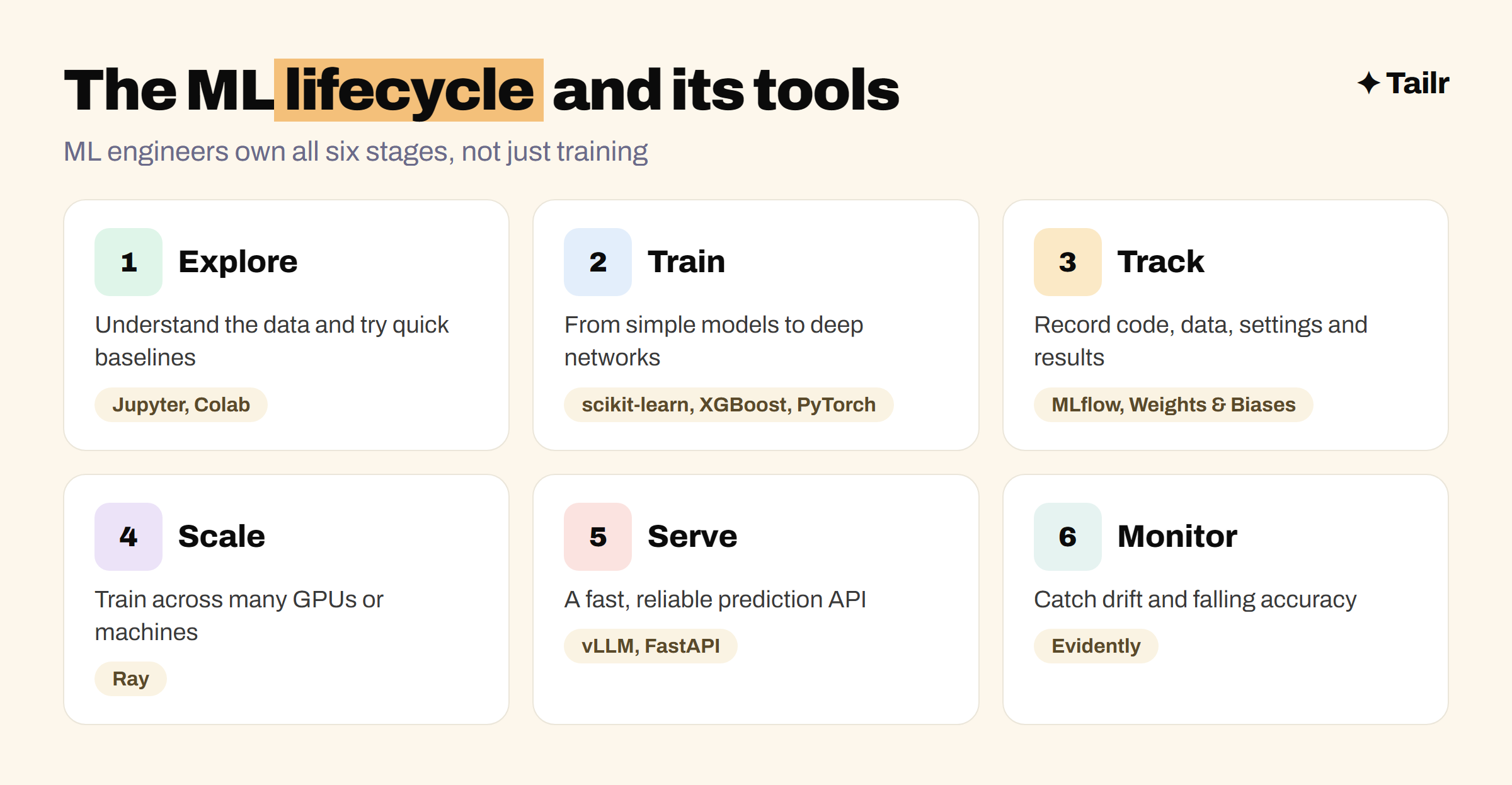
A model moves through the same stages whatever it predicts:
- Explore: understand the data and try quick baselines.
- Train: build models, from simple ones to deep networks.
- Track: record every experiment’s code, data, settings and results.
- Scale: train or process data across many GPUs or machines.
- Serve: expose the model through a fast, reliable API.
- Monitor: watch for drift, errors and falling accuracy.
Data scientists spend most of their time in the first two stages. ML engineers own all six, which is why the role leans on software engineering as much as on statistics. If you’re building on top of hosted language models rather than training your own, our guide to the best tools for building AI apps is a better fit.
1. PyTorch
Website: pytorch.org
PyTorch is the dominant deep learning framework in 2026, used across research and most new industry projects. It feels like regular Python, so models are easy to write and debug, and its ecosystem covers computer vision, audio, language models and distributed training. Most open models released on Hugging Face are PyTorch models. TensorFlow (tensorflow.org) and JAX (jax.readthedocs.io) are the main alternatives, the first mostly in older production systems and the second in some research labs.
Why use it:
- The default framework for deep learning research and industry.
- Pythonic and easy to debug.
- Huge ecosystem of models and libraries.
Best for: every ML engineer working with neural networks.
2. scikit-learn
Website: scikit-learn.org
scikit-learn is the standard Python library for classic machine learning: regression, classification, clustering, preprocessing, pipelines and model evaluation. Plenty of real business problems run on tabular data where a well-tuned scikit-learn model beats a neural network and is far easier to explain. Its consistent fit and predict interface is also how most people learn machine learning in the first place.
Why use it:
- Covers most classic algorithms with one consistent API.
- Excellent tools for preprocessing, cross-validation and metrics.
- Fast to train and easy to explain.
Best for: tabular problems, baselines and anyone learning machine learning.
3. XGBoost and LightGBM
Website: xgboost.ai and lightgbm.readthedocs.io
Gradient boosting libraries are often the most accurate option on tabular data, which is why they show up in so many production systems for fraud scoring, pricing, ranking and churn prediction. XGBoost is the long-standing standard; LightGBM, from Microsoft, is known for training quickly on large datasets. CatBoost (catboost.ai) handles categorical features especially well. All three plug into scikit-learn pipelines.
Why use it:
- Often the best accuracy on tables.
- Fast training and inference.
- Works with scikit-learn tooling.
Best for: tabular prediction problems in production.
4. Jupyter and Google Colab
Website: jupyter.org and colab.research.google.com
Notebooks are where exploration happens. Jupyter lets you mix code, charts and notes, and run one step at a time, which is ideal for understanding a dataset or comparing a few models. Google Colab runs notebooks in the browser with free access to GPUs, which makes it the easiest way to train a deep learning model without your own hardware. Move code into proper Python modules once it works; notebooks are for exploring, not for production.
Why use it:
- Fast feedback while exploring data and models.
- Colab gives free GPU access for learning.
- Easy to share results with your team.
Best for: exploration, prototypes and learning.
5. Hugging Face
Website: huggingface.co
Hugging Face is the central hub for pretrained models and datasets, and its libraries are how most engineers use them. Transformers loads and runs thousands of models, Datasets handles loading and processing data efficiently, and libraries like PEFT and TRL make fine-tuning large models practical on modest hardware. Starting from a pretrained model and adapting it is now the normal approach for language, vision and audio problems.
Why use it:
- The largest library of open models and datasets.
- Libraries for training, fine-tuning and evaluation.
- Hosted demos and inference options.
Best for: anyone working with language, vision or audio models.
6. MLflow
Website: mlflow.org
MLflow is an open-source platform for managing the ML lifecycle. Its experiment tracking records the parameters, metrics and artefacts of every run so you can compare them; its model registry versions models and tracks which one is in production; and it has tools for packaging and deploying models. It was created by Databricks and is built into the Databricks platform, but you can self-host it anywhere. Recent versions have also added tracing and evaluation for language model apps.
Why use it:
- Free and open source.
- Experiment tracking and model registry in one tool.
- Built into Databricks and widely supported.
Best for: teams that want open-source tracking, and anyone working on Databricks.
7. Weights & Biases
Website: wandb.ai
Weights & Biases is a hosted platform for tracking experiments, visualising training runs, comparing models and sharing reports. Its dashboards are especially good for deep learning: watching loss curves live, comparing dozens of runs side by side and tuning hyperparameters with sweeps. It’s popular with research teams and companies training large models. It’s been part of CoreWeave, the GPU cloud company, since 2025.
Why use it:
- Polished, real-time dashboards for training runs.
- Hyperparameter sweeps and shareable reports.
- Free for personal and academic projects.
Best for: deep learning teams and researchers running many experiments.
8. Ray
Website: ray.io
When one GPU or one machine isn’t enough, Ray spreads Python work across a cluster. It has libraries for distributed training (Ray Train), hyperparameter tuning (Ray Tune), batch data processing (Ray Data) and model serving (Ray Serve). It’s open source and used at many companies training and serving models at scale; Anyscale, the company behind it, offers a managed version.
Why use it:
- Scale Python and PyTorch code across many machines.
- Libraries for training, tuning, data processing and serving.
- Open source with a managed option.
Best for: teams training on large datasets or many GPUs.
9. vLLM
Website: docs.vllm.ai
Serving a large language model efficiently is its own engineering problem: GPU memory, batching many requests together and keeping latency low. vLLM is an open-source inference engine that handles this and is widely used to serve open models in production, with an API compatible with common model provider formats. For classic models, simpler options like FastAPI (fastapi.tiangolo.com) in a Docker container, BentoML (bentoml.com) or NVIDIA Triton are more common.
Why use it:
- High-throughput, memory-efficient serving for open language models.
- Supports most popular open model families.
- Open source and widely adopted.
Best for: teams self-hosting open language models.
10. Evidently
Website: evidentlyai.com
Models don’t crash when they get worse; they just start making worse predictions as the real world drifts away from the training data. Evidently is an open-source library for monitoring that: it compares production data with training data, tracks model quality over time and produces reports and dashboards. It also includes evaluation tools for language model outputs.
Why use it:
- Detects data and prediction drift.
- Open-source reports and dashboards.
- Works for both classic models and language models.
Best for: any team with models in production.
Machine learning tools compared
| Tool | Stage | Open source | Learn it when |
|---|---|---|---|
| PyTorch | Train | Yes | Early, after Python basics |
| scikit-learn | Train | Yes | First |
| XGBoost / LightGBM | Train | Yes | With scikit-learn |
| Jupyter / Colab | Explore | Jupyter, yes | From day one |
| Hugging Face | Train, fine-tune | Libraries, yes | With PyTorch |
| MLflow | Track | Yes | Once you run many experiments |
| Weights & Biases | Track | No (free tier) | Deep learning projects |
| Ray | Scale | Yes | When one machine isn’t enough |
| vLLM | Serve | Yes | Self-hosting language models |
| Evidently | Monitor | Yes | Once a model is in production |
How to learn ML engineering tools efficiently
Most ML portfolios stop at “I trained a model in a notebook.” That’s exactly the part hiring managers care least about. Build one project that goes all the way to production instead:
- Pick a real problem with real data, like predicting delivery delays or classifying support tickets.
- Start with a scikit-learn or XGBoost baseline, then try a PyTorch or Hugging Face model and compare honestly.
- Track every run in MLflow or Weights & Biases.
- Serve the best model behind a FastAPI endpoint in Docker, and deploy it with a simple CI pipeline. The best DevOps and CI/CD tools covers how.
- Add Evidently and simulate drift to show you’d catch it.
- Write up the trade-offs: why you chose that model, how fast it is and what it costs to run.
Data quality decides most ML projects, so it helps to know the pipeline tools too; see the best tools for data engineers. For the interview side, our AI engineer interview questions cover much of the same ground.
For ML engineers job hunting
“Machine learning engineer” means very different jobs at different companies. One listing wants PyTorch, distributed training and CUDA; another wants scikit-learn, feature pipelines and MLflow; another wants language model fine-tuning and vLLM. Your projects probably cover more than one, but your resume needs to lead with the one each listing cares about.
Tailr is a Chrome extension that tailors your resume to the job listing you’re viewing, so the frameworks, projects and results that role asks for come first, in its own wording. It also writes a matching cover letter and tracks the application. Try Tailr on your next ML application, and read what an AI engineer does if you’re weighing that path too.
Conclusion
The best tools for machine learning engineers in 2026 follow the model’s lifecycle: Jupyter to explore, scikit-learn, XGBoost and PyTorch to train, Hugging Face to start from pretrained models, MLflow or Weights & Biases to track, Ray to scale, vLLM or FastAPI to serve and Evidently to monitor. Learn the training tools first, but don’t stop there. The engineers who get hired are the ones who can show a model running in production, not just a good score in a notebook.
Frequently asked questions
01What tools do machine learning engineers use?
Machine learning engineers typically use Python with PyTorch for deep learning, scikit-learn and XGBoost for classic models, Jupyter for exploration, Hugging Face for pretrained models, MLflow or Weights & Biases to track experiments, Ray for distributed training, a serving tool like vLLM, and a monitoring tool like Evidently once models are in production.
02Should I learn PyTorch or TensorFlow in 2026?
Learn PyTorch first. It's the dominant framework in research and in most new industry projects, and most open models on Hugging Face are released for it. TensorFlow is still found in older production systems, so it can be worth learning later if a specific job asks for it.
03What is MLOps?
MLOps is the set of practices and tools for getting machine learning models into production and keeping them working: tracking experiments, versioning data and models, automating training and deployment, serving predictions and monitoring for problems like data drift. Tools like MLflow, Weights & Biases and Evidently cover parts of it.
04Is MLflow or Weights & Biases better?
MLflow is open source and free to self-host, and it covers experiment tracking, a model registry and deployment. Weights & Biases is a hosted platform with a more polished interface and strong collaboration and visualisation features. Many companies use MLflow, especially on Databricks, while research teams often prefer Weights & Biases.
05Do machine learning engineers still need scikit-learn?
Yes. Many real business problems, like churn prediction, fraud scoring and forecasting on tabular data, are still solved best with scikit-learn models or gradient boosting libraries like XGBoost and LightGBM. They're faster to train, easier to explain and often more accurate on tables than deep learning.
06How do I get machine learning experience for my resume?
Build two or three end-to-end projects: train a model on a real dataset, track the experiments, deploy it behind an API and monitor it. Write up what you tried, what worked and the trade-offs. Tailor each application so the frameworks and project results that listing asks for appear first.