Best DevOps and CI/CD Tools in 2026
· updated
DevOps job listings are long lists of tool names, and the DevOps landscape has hundreds more. The good news is that most teams build on the same small core: somewhere to keep code, something to build and test it automatically, a way to package it, somewhere to run it, a way to define the infrastructure, and a way to see when it breaks. This guide covers the best tool for each of those jobs in 2026, and which ones to learn first.
The short answer: the best DevOps and CI/CD tools in 2026 are:
- Git with GitHub or GitLab: where code and collaboration live.
- GitHub Actions: the easiest CI/CD to start with.
- GitLab CI/CD: CI/CD built into an all-in-one platform.
- Jenkins: the flexible, self-hosted veteran.
- Docker: packaging apps into containers.
- Kubernetes: running containers at scale.
- Terraform and OpenTofu: infrastructure as code.
- Argo CD: GitOps deployments to Kubernetes.
- Ansible: configuring servers.
- Prometheus and Grafana: monitoring and dashboards.
For a new project, a solid default is GitHub Actions, Docker, Terraform and Grafana, adding Kubernetes and Argo CD when you outgrow a single server.
What a DevOps toolchain needs to do
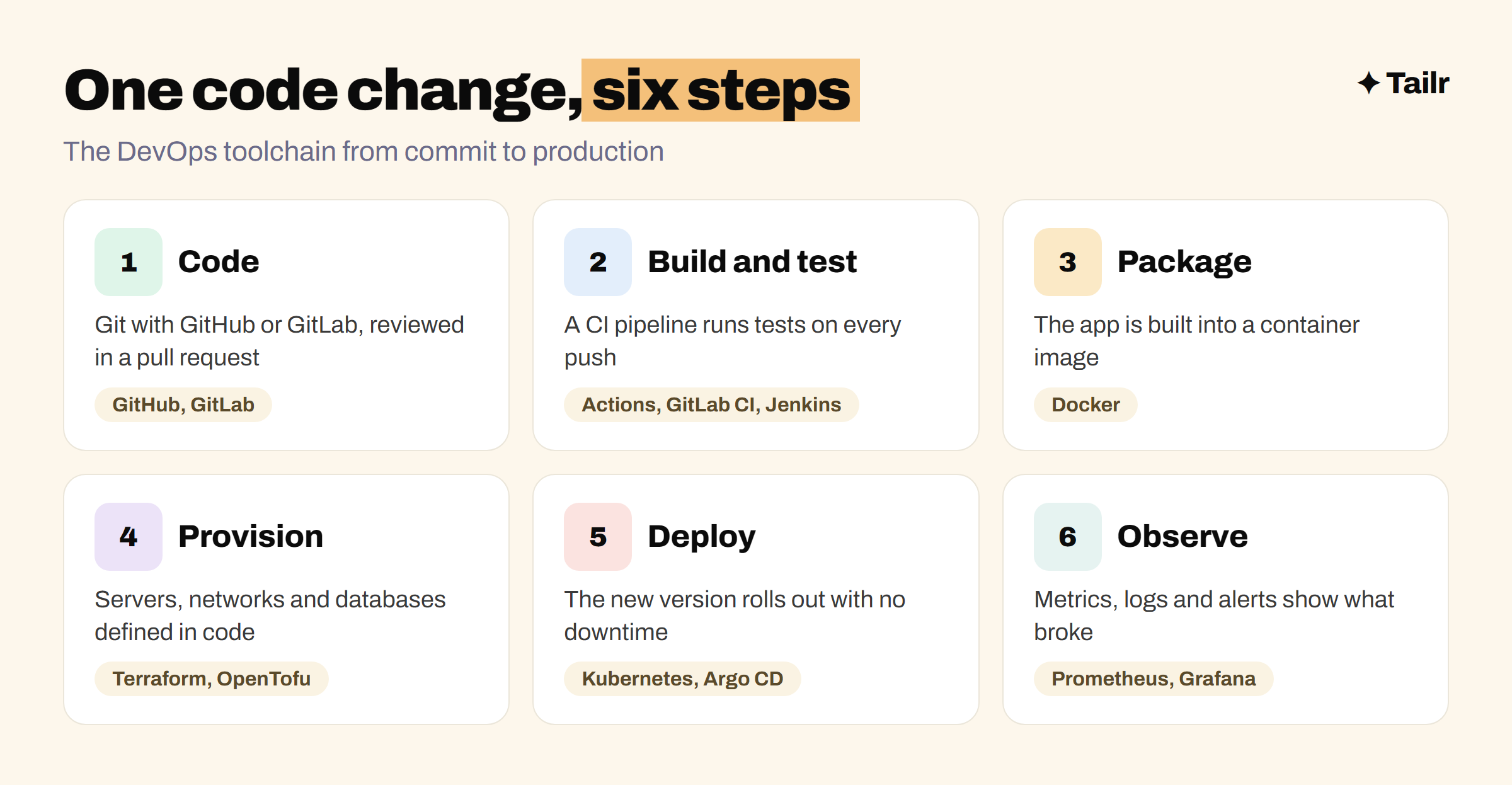
A useful way to think about DevOps tools is to follow one code change from a developer’s laptop to production:
- Code: the change is pushed to a Git repository and reviewed in a pull request.
- Build and test: a CI pipeline runs the tests automatically on every push.
- Package: the app is built into a container image.
- Provision: the servers, databases and networks it needs are defined in code.
- Deploy: the new version is rolled out, ideally with no downtime.
- Observe: metrics, logs and alerts tell you if something went wrong.
Each tool on this list covers one or two of those steps. When you compare tools, ask which step it owns, whether it fits where your code already lives, and how much work it is to maintain. A tool you have to babysit costs more than its licence.
1. Git with GitHub or GitLab
Website: github.com and gitlab.com
Everything in DevOps starts with Git. Application code, pipeline files, infrastructure definitions and Kubernetes manifests all live in repositories, and changes go through pull requests (GitHub) or merge requests (GitLab). GitHub is the largest code host and the default for open source. GitLab is a single platform that covers code, CI/CD, security scanning and more, and it’s popular with companies that want to self-host.
Why use it:
- Every other tool on this list plugs into it.
- Pull requests are where code review and approvals happen.
- Your public repositories double as a portfolio.
Best for: everyone. If you’re new to it, our guide to your first open source contribution is a good way to practise the workflow.
2. GitHub Actions
Website: github.com/features/actions
GitHub Actions is CI/CD built into GitHub. You add a YAML file to your repository that says “on every push, install dependencies, run the tests, build the app”, and GitHub runs it. It’s free for public repositories, includes free minutes for private ones, and has a huge marketplace of ready-made actions for common tasks like deploying to a cloud provider. It’s the most common starting point for new projects in 2026.
Why use it:
- No separate server to set up or maintain.
- Lives next to your code and pull requests.
- Thousands of reusable actions for common steps.
Best for: teams already on GitHub, and anyone learning CI/CD for the first time.
3. GitLab CI/CD
Website: docs.gitlab.com/ci
GitLab CI/CD is GitLab’s built-in pipeline tool, configured with a .gitlab-ci.yml file. It’s known for strong pipeline features, built-in container registry and security scanning, and the option to run everything on your own servers. Companies that self-host GitLab usually run all their CI/CD through it.
Why use it:
- Code, pipelines, registry and security scans in one place.
- Can be fully self-hosted.
- Mature pipeline features for complex projects.
Best for: companies on GitLab, and teams that need to keep everything on their own infrastructure.
4. Jenkins
Website: jenkins.io
Jenkins is the open-source automation server that much of the industry ran on for over a decade. It can do almost anything thanks to a very large plugin ecosystem, and pipelines are written as code in a Jenkinsfile. The trade-off is maintenance: you run the server, update the plugins and fix them when they break. New projects tend to pick GitHub Actions or GitLab CI, but Jenkins is still everywhere at large companies, so it’s still common in job listings.
Why use it:
- Free and open source, with plugins for almost everything.
- Works in self-hosted and air-gapped environments.
- Still in heavy use at large companies.
Best for: large organisations with custom build needs, and DevOps engineers applying to enterprises.
5. Docker
Website: docker.com
Docker packages an app and everything it needs into a container image that runs the same way on a laptop, a CI runner and a production server. It’s the end of “it works on my machine.” Learn to write a Dockerfile, build and run images, and use Docker Compose to run an app with its database locally. Almost every modern deployment path starts with a container image.
Why use it:
- Same environment everywhere, from laptop to production.
- The standard unit for CI, Kubernetes and cloud platforms.
- Docker Compose makes local multi-service setups easy.
Best for: everyone. Learn it right after Git.
6. Kubernetes
Website: kubernetes.io
Kubernetes runs containers across a cluster of machines. You describe what you want (“three copies of this app, behind this load balancer”) and Kubernetes keeps it that way, restarting failed containers and rolling out new versions. All major clouds offer a managed version (EKS on AWS, GKE on Google Cloud, AKS on Azure). It’s powerful and complex, so it’s worth it when you have many services or need to scale, and overkill for a single small app.
Why use it:
- The standard way to run containers at scale.
- Self-healing and rolling updates built in.
- Managed versions on every major cloud.
Best for: teams running many services, and anyone aiming for DevOps or platform engineering roles.
7. Terraform and OpenTofu
Website: terraform.io and opentofu.org
Terraform lets you define cloud infrastructure, like servers, databases, networks and DNS, in code, then create or change it with one command. Because it’s code, infrastructure changes go through pull requests and review like everything else. Terraform is made by HashiCorp, now part of IBM. OpenTofu (opentofu.org) is an open-source fork run under the Linux Foundation, started after Terraform’s licence changed in 2023, and it’s largely compatible with Terraform’s language. Learn one and you can use the other.
Why use it:
- Infrastructure that’s reviewable, repeatable and version-controlled.
- Works across AWS, Google Cloud, Azure and hundreds of other providers.
- Terraform is the most requested infrastructure-as-code skill in job listings.
Best for: anyone managing cloud infrastructure. Pulumi (pulumi.com) is an alternative if you’d rather write infrastructure in a general-purpose language like TypeScript or Python.
8. Argo CD
Website: argo-cd.readthedocs.io
Argo CD brings GitOps to Kubernetes. Instead of a pipeline pushing changes into the cluster, Argo CD watches a Git repository and makes the cluster match it. Want to deploy? Merge a pull request. Want to roll back? Revert it. It’s an open-source CNCF project with a clear web UI that shows what’s deployed and whether it matches Git. Flux (fluxcd.io) is the main alternative.
Why use it:
- Git becomes the single source of truth for what’s running.
- Rollbacks are a Git revert.
- Clear view of drift between Git and the cluster.
Best for: teams deploying to Kubernetes.
9. Ansible
Website: ansible.com
Ansible, from Red Hat, automates server configuration: installing packages, editing config files, restarting services. You write playbooks in YAML and Ansible runs them over SSH, with no agent to install on the servers. Terraform creates the machines; Ansible is often what sets them up. It’s less central in container-first setups, but still common wherever teams manage virtual machines or on-premises servers.
Why use it:
- Agentless, so it works on existing servers over SSH.
- Readable YAML playbooks.
- Strong fit for VMs and on-premises infrastructure.
Best for: teams managing servers and virtual machines.
10. Prometheus and Grafana
Website: prometheus.io and grafana.com
Shipping is half the job; knowing when it breaks is the other half. Prometheus collects metrics like request rate, error rate and memory use, and fires alerts when they cross a threshold. Grafana turns those metrics, plus logs and traces, into dashboards. Both are open source and form the default monitoring stack for Kubernetes. Datadog (datadoghq.com) is the most common paid, fully hosted alternative.
Why use it:
- Open-source, widely adopted monitoring standard.
- Dashboards and alerts for everything you run.
- Grafana connects to dozens of data sources.
Best for: every team running software in production.
DevOps and CI/CD tools compared
| Tool | Step it covers | Open source | Learn it when |
|---|---|---|---|
| Git with GitHub / GitLab | Code | Git and GitLab core | First |
| GitHub Actions | Build and test | No (free tier) | After Git |
| GitLab CI/CD | Build and test | Core, yes | If your team uses GitLab |
| Jenkins | Build and test | Yes | For enterprise roles |
| Docker | Package | Engine, yes | Right after Git |
| Kubernetes | Run | Yes | After Docker |
| Terraform / OpenTofu | Provision | OpenTofu, yes | After CI/CD |
| Argo CD | Deploy | Yes | With Kubernetes |
| Ansible | Configure | Yes | For VM-heavy teams |
| Prometheus and Grafana | Observe | Yes | Once something is in production |
How to learn DevOps tools efficiently
Learning tools one at a time from tutorials is slow, because the value of DevOps is in how they connect. Build one small project that goes all the way through instead:
- Write a tiny web app with a health-check endpoint and a couple of tests, and push it to GitHub.
- Add a GitHub Actions workflow that runs the tests on every pull request.
- Add a Dockerfile and have the workflow build and push the image.
- Provision a small cloud server or managed Kubernetes cluster with Terraform.
- Deploy to it automatically when you merge to main, using Argo CD if you went the Kubernetes route.
- Add Prometheus and a Grafana dashboard, then break something on purpose and watch the alert fire.
Write up what you built and what went wrong in the README. That one repository answers most of the questions a DevOps interviewer will ask, and it’s a much stronger signal than a list of certificates. If you just want to get a project online quickly first, see our guides to deploying on Vercel for free and deploying on GitHub Pages. For the developer side of the stack, see the best tools for software developers, and for the interview, how to prepare for a system design interview.
For DevOps engineers job hunting
DevOps listings are some of the most tool-specific in tech. One company wants Jenkins, Ansible and VMware; the next wants GitHub Actions, Terraform, EKS and Argo CD. A single generic resume that lists everything reads as unfocused, and one that leads with the wrong stack gets passed over.
Tailr is a Chrome extension that tailors your resume to the job listing you’re viewing, so the tools and projects that role cares about come first, in the listing’s own wording. It also generates a matching cover letter and tracks the application. Try Tailr to apply to more DevOps and platform roles without rewriting your resume for each one, and see the best job boards for tech jobs for where to find them.
Conclusion
The best DevOps and CI/CD tools in 2026 form a chain: Git for code, GitHub Actions, GitLab CI or Jenkins for pipelines, Docker for packaging, Kubernetes for running, Terraform or OpenTofu for infrastructure, Argo CD for deploying, and Prometheus with Grafana for watching it all. You don’t need every link on day one. Start with Git, Docker and GitHub Actions, build one project that ships to production on every merge, and add the rest as your projects need them.
Frequently asked questions
01What are the most popular DevOps tools in 2026?
The core DevOps stack in 2026 is Git with GitHub or GitLab for code, GitHub Actions, GitLab CI or Jenkins for CI/CD, Docker for containers, Kubernetes for running them, Terraform or OpenTofu for infrastructure as code, Argo CD for GitOps deployments, and Prometheus with Grafana for monitoring.
02What is the best CI/CD tool for beginners?
GitHub Actions is the easiest place to start. It lives inside your GitHub repository, uses simple YAML files, is free for public repositories and has thousands of ready-made actions. Once you understand pipelines there, the ideas carry over to GitLab CI and Jenkins.
03Is Jenkins still used in 2026?
Yes. Jenkins is still widely used, especially at large companies with self-hosted, highly customised or air-gapped build setups. New projects more often start on GitHub Actions or GitLab CI because they need less maintenance, but Jenkins experience is still asked for in many DevOps job listings.
04What is the difference between Terraform and OpenTofu?
OpenTofu is an open-source fork of Terraform, created in 2023 after HashiCorp moved Terraform to a source-available licence. It's run under the Linux Foundation and is largely compatible with Terraform's language and providers. Terraform is still the more common name in job listings; OpenTofu appeals to teams that want a fully open-source licence.
05Do I need to learn Kubernetes for DevOps?
For most DevOps and platform engineering roles, yes, at least the basics: pods, deployments, services and how to read a manifest. Smaller companies may run on simpler platforms, but Kubernetes shows up in a large share of DevOps job listings, so it's worth learning after Docker.
06In what order should I learn DevOps tools?
Start with Linux and Git, then Docker, then a CI/CD tool like GitHub Actions. After that, learn Terraform or OpenTofu for infrastructure, then Kubernetes, then monitoring with Prometheus and Grafana. Build one project that uses all of them together rather than learning each in isolation.