How to Get Started With Vibe Coding: A Beginner's Guide
· updated
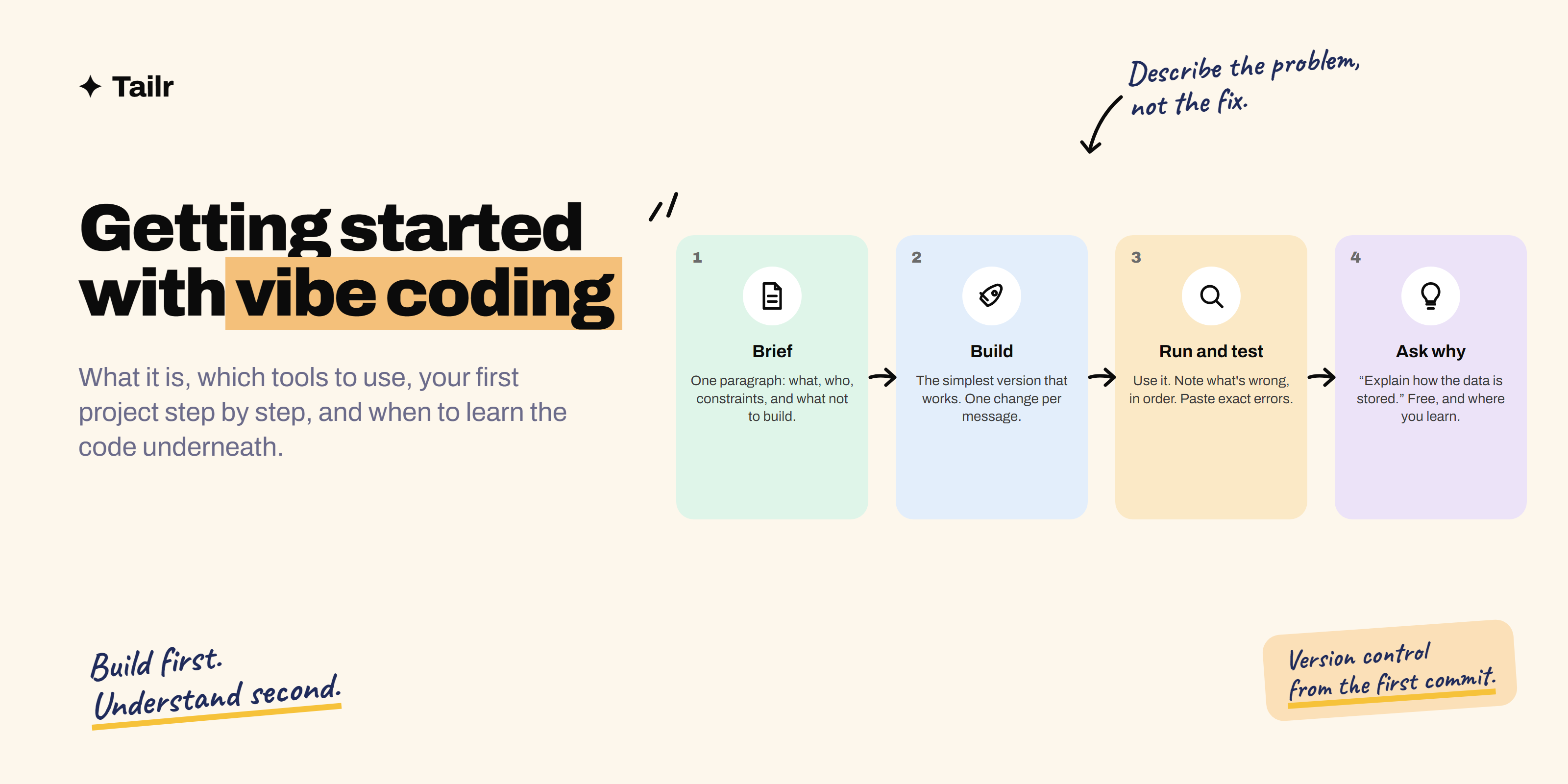
A year or two ago, building a working web app meant learning a language, a framework, a database and a deployment pipeline before you saw anything on screen. Now you can describe the app in a paragraph, watch it appear, and spend the afternoon refining it by talking to it. That’s vibe coding, and it’s the way a lot of people are building their first software. This guide covers what it is, which tools to start with, how to build your first project, how to prompt so the results are good, the habits that keep you safe, and the point at which you should learn what’s under the hood.
The short answer: Vibe coding is building software by describing what you want to an AI coding tool, running the result, and describing the next change, without hand-writing the code. To start:
- Pick a browser-based builder (Lovable, Bolt, v0 or Replit) so there’s nothing to install.
- Choose a small project with one screen and one job.
- Describe the outcome, the users and the constraints in a paragraph.
- Build in small steps, testing each.
- Ask the tool to explain what it did.
- Keep everything in version control.
- Never paste secrets or deploy anything handling other people’s data without review.
When you outgrow the builder, move to an AI editor like Cursor or a terminal agent like Claude Code, and start reading the code it writes.
What vibe coding is
The term comes from a February 2025 post by Andrej Karpathy, who described a way of working where you “fully give in to the vibes”, talk to the AI, accept the code without reading it closely, and describe errors back to it until they go away. It was half a joke about how good the tools had become, and it stuck because it named something real: a large number of people were building working software without engaging with the code.
In practice it covers a spectrum:
- Pure vibe: describe, run, describe the fix, never open the code. Fine for throwaway prototypes and personal tools.
- Directed building: you know what you want architecturally, you set constraints, the tool writes the code, you read the summaries and test the result. Where most productive beginners end up.
- AI-assisted engineering: an experienced developer using the same tools to move ten times faster, reviewing everything. Not really “vibe” coding, but the same tools and the direction of travel for anyone who keeps going.
The rest of this guide gets you from the first to the second, and points at the third.
What it’s good for, and what it isn’t
Good for:
- Prototypes and demos: something to show, test with users, or pitch.
- Personal tools: the spreadsheet cleaner, the tracker, the bot that does the thing you do every Monday.
- Learning by building: you’ll understand what a database, an API and a deployment are by watching them appear.
- Internal tools at work: a dashboard, a form, a small automation, where the users are your team.
- Small public projects: a personal site, a quiz, a calculator, a landing page.
Not good for, at least not alone:
- Anything handling other people’s money or sensitive data.
- Anything that has to be secure against people trying to break it.
- Large systems that many people will maintain for years.
- Anything where you’d be unable to explain or fix a failure.
The line isn’t “vibe coding can’t build it”. The line is whether you can take responsibility for what’s built.
The tools, and which to start with
Browser-based app builders. Describe an app, get a deployed one, with hosting, a database and often authentication handled for you. Nothing to install. Best starting point for complete beginners.
- Lovable — full-stack web apps from a description, with a database and auth built in; strong at polished front ends.
- Bolt — similar, with a live editor alongside the chat; good for iterating quickly.
- v0 — from Vercel; strongest at UI and front-end components, especially if you’ll use React later.
- Replit — a full online development environment with an agent that builds and deploys; broadest scope, slightly more to learn.
AI-native editors. A code editor with the AI built into every part: it reads your whole project, edits multiple files, runs commands. You need to be able to set up a project on your machine.
- Cursor — the most widely used; a fork of VS Code with agent modes.
- Windsurf — similar, with a strong agent flow.
Terminal agents. You give instructions at the command line; the agent reads, edits, runs and tests across the codebase. Most powerful, least hand-holding.
- Claude Code, Codex CLI, and similar agents from other providers. See how to use Claude Code.
Assistants inside a standard editor.
- GitHub Copilot in VS Code or JetBrains — autocomplete plus chat and agent modes; the gentlest step up from a builder if you already use VS Code.
Recommendation: start with Lovable, Bolt or v0 for your first two projects. Move to Cursor or a terminal agent for the third, when you want to own the code. Best AI coding tools for developers compares them in more depth.
Your first project, step by step
Pick something with one screen and one job that you’d actually use. A habit tracker is the classic first project; substitute your own.
1. Write the brief before you open the tool
One paragraph, in a text file. What it does, who uses it, what it must and mustn’t do, what it looks like.
A personal habit tracker. One user (me), no login. Shows a list of habits I define, with a checkbox for each day of the current week. Clicking a checkbox toggles it and saves. Shows a streak count per habit. Data must persist between visits. Clean, minimal, works on my phone. No accounts, no notifications, no sharing.
The last sentence matters as much as the first. Saying what you don’t want stops the tool building it.
2. Start the build with the brief
Paste the brief as your first message. Add: “Build the simplest version that works. Don’t add features I didn’t ask for. Tell me what you built and how to run it.”
3. Run it and use it immediately
Don’t read the code yet. Use the app. Add a habit, tick some boxes, refresh the page, open it on your phone. Note everything that’s wrong or missing, in order of importance.
4. Fix one thing at a time
Describe the problem, not the solution: “When I refresh the page, my habits disappear” is better than “add localStorage”. The tool knows the solutions; you know the problem. One fix per message. Test after each.
5. Add features one at a time, the same way
“Add a streak count next to each habit: consecutive days ticked up to today.” Test. “Make the streak turn green at 7 days.” Test.
6. Ask it to explain
After a few rounds: “Explain how the data is stored and what would happen if I cleared my browser data.” “What are the three most likely bugs in this app?” “What would need to change to support two users?” This is where the learning happens, and it costs nothing.
7. Save and ship
Put the code in version control (most builders have a “connect to GitHub” button; do it). Deploy it (builders do this with one click). Use it for a week. Then decide on the next project.
Prompting habits that make the difference
- Describe outcomes, users and constraints. “A form for our team to log expenses, five fields, saves to a spreadsheet, must work on phones” beats “make an expense app”.
- Say what not to build. Every unwanted feature is a source of bugs and confusion.
- Small steps. One change per message. Big requests produce big, tangled changes that are hard to undo.
- Describe problems, not fixes. Unless you know the fix is right.
- Ask for the plan first on bigger changes. “Before changing anything, tell me how you’d add user accounts and what would change.” Then approve or adjust.
- Ask for tests. “Add tests for the streak calculation, including the edge cases: no ticks, a gap yesterday, ticked today only.” Tests are how you find out the tool got it wrong before you do.
- Ask it to check its own work. “Review the change you just made for bugs and security issues.” It finds things.
- Paste the exact error. Don’t paraphrase. The full error message, every time.
- Reset when it’s going in circles. If three fixes haven’t worked, describe the situation fresh in a new conversation, or undo to the last working version and try a different approach.
12 types of prompting methods covers the general techniques; the ones above are the ones that matter for code.
Staying safe
These habits cost minutes and prevent the failures that give vibe coding a bad name:
- Version control from the first commit. Connect to GitHub before you build anything you’d miss. Every working state gets committed. This is your undo button.
- Never put secrets in prompts or code. API keys, passwords, tokens. If a tool asks for a key, use its secrets or environment-variable feature, and never commit them.
- Read the change summaries. You don’t have to read the code, but read what the tool says it changed. If it touched something unrelated to your request, ask why.
- Don’t deploy other people’s data. Personal use and prototypes: fine. A form your customers fill in, anything with payments, anything with health or financial information: not without someone who understands the code reviewing it for authentication, authorisation and injection.
- Keep a working version. Deploy from a tagged, tested state, not from whatever you were experimenting with.
- Know what it costs. Builders and hosting have free tiers with limits. Check before something goes viral, or before you leave a background job running.
- Ask the tool about risks. “What would a malicious user try on this app, and does it defend against it?” You’ll learn, and it’ll often fix things.
Common beginner mistakes
- The giant first prompt. Fifteen features in one message produces a broken app and no idea which part failed.
- Never running it. Reading the code isn’t testing. Click things.
- Accepting everything. If the tool adds a feature you didn’t ask for, say so. It compounds.
- Fighting it for an hour. After three failed fixes, undo and reframe.
- Skipping version control because the project is small. It’s small until it isn’t, and the one time you need to undo is the time you didn’t commit.
- Deploying the prototype as the product. The prototype proved the idea. The product needs review.
- Never asking why. The explanations are free and they’re the difference between a person who can vibe code and a person who can build software.
When to learn the code underneath
You’ll know. It’s the moment a bug persists across five prompts and you realise you can’t tell whether the tool’s explanation is right; or the app has grown to twenty files and every change breaks something; or you want to deploy it for real and someone asks how authentication works. At that point:
- Read the code the tool writes, with the tool. “Walk me through this file, line by line.” Do this for the core of your app. A few hours.
- Learn the vocabulary. Component, state, route, API, database, migration, environment variable, deploy. You’ve already seen them all; now attach the words.
- Do a short structured course in the language your project uses, usually JavaScript or Python. Two to four weeks of evenings. You’ll move fast because you’ve already built things.
- Rebuild your first project by hand, with the tool as a helper rather than the author. This is the step that turns vibe coding into engineering.
The people getting the most from these tools aren’t the ones who never look at the code, and they aren’t the ones who refuse to use the tools. They’re the ones who build first, learn what they built, and keep both skills.
What this means for careers
Vibe coding on its own isn’t a job qualification; developer interviews still test whether you understand the code. But it changes two things. First, it’s the fastest path into software that has ever existed, and the projects you ship are a portfolio that used to take years. Second, roles outside engineering, in product, operations, marketing, sales ops and analysis, increasingly want people who can build their own tools, and “built and shipped an internal tool that saved the team ten hours a week” is a bullet that gets interviews.
If you’re aiming at engineering, use these tools to build, then learn the code, then aim at roles like AI engineer where using these tools well is part of the job. If you’re in another field, what is a GTM engineer is a good example of the roles that have appeared for people who can build without being traditional developers.
Where Tailr fits
Whatever you build, it goes on the resume as a project: what it does, what it’s built with, who uses it, and a number. Job listings that value this describe it in their own terms, “automation”, “internal tools”, “no-code/low-code”, “prototyping”, “AI tools”, and matching that language is what gets the project noticed. Tailr tailors your resume to the specific listing you’re viewing, so the projects and skills that role cares about lead, phrased the way the listing phrases them, with a cover letter to match. How to write a resume with no experience covers how to write projects so they count. Try Tailr on the next listing you open.
Conclusion
Vibe coding is describing software into existence and refining it by conversation. Start in a browser builder with a one-screen project you’d use, write the brief before you start, build in small tested steps, ask the tool to explain itself, keep everything in version control, and never ship other people’s data without review. When you hit the wall where you can’t judge what the tool did, that’s the signal to learn the code, with the tool as your tutor. Build first, understand second, keep both. That’s the whole method, and it’s a better way into software than most people had before.
Frequently asked questions
01What is vibe coding?
Vibe coding is building software by describing what you want to an AI coding tool in plain language, running what it produces, and describing the next change or the fix, without writing or closely reading the code yourself. The term was coined by Andrej Karpathy in February 2025 to describe giving in to the vibes and letting the model handle the code. It ranges from casual (a weekend prototype you never look inside) to a serious workflow where you direct and review but rarely type.
02Can you vibe code with no programming experience?
Yes, for prototypes, personal tools, small websites and internal apps. The tools have become good enough that a clear description and patient iteration produce working software. What you can't do without some understanding is judge whether the result is secure, maintainable or correct in the cases you didn't test, which is why the guidance for beginners is: build freely, deploy carefully, and learn as you go.
03What tools do I need for vibe coding?
One of three kinds. Browser-based app builders (Lovable, Bolt, v0, Replit) need no setup and produce a deployed web app from a description; best for complete beginners. AI-native editors (Cursor, Windsurf) and terminal agents (Claude Code, Codex CLI) work on real codebases on your machine and suit people who can set up a project. AI assistants inside a standard editor (GitHub Copilot in VS Code) sit in between. Start with a browser builder, move to an editor when you outgrow it.
04What should I build first with vibe coding?
Something small that you'd actually use, with a clear finish line: a habit tracker, a tool that reformats a spreadsheet you deal with every week, a personal site, a quiz for something you're learning, a bot that summarises your bookmarks. One screen, one job, no user accounts, no payments. Ship it, use it for a week, then add one feature. The second project can be bigger.
05Is vibe coding safe?
For personal and prototype projects, yes, with basic habits: keep your code in version control so you can undo, never paste API keys or passwords into prompts or code, don't deploy anything that handles other people's data or money until someone who understands the code has reviewed it, and read what the tool tells you it changed. The risks are real for production software; they're manageable for learning and prototyping.
06Will vibe coding get me a developer job?
Not on its own, but it's the fastest route into understanding what software is and how it's built, and the projects you ship are portfolio material. Employers hiring developers still test coding and design understanding; employers hiring for product, ops, marketing and analyst roles increasingly value people who can build their own tools. Use it to build things, then learn enough of the code underneath to explain what you built.