What Is Trytailr.com? Tailr's Resume Extension, Explained
· updated
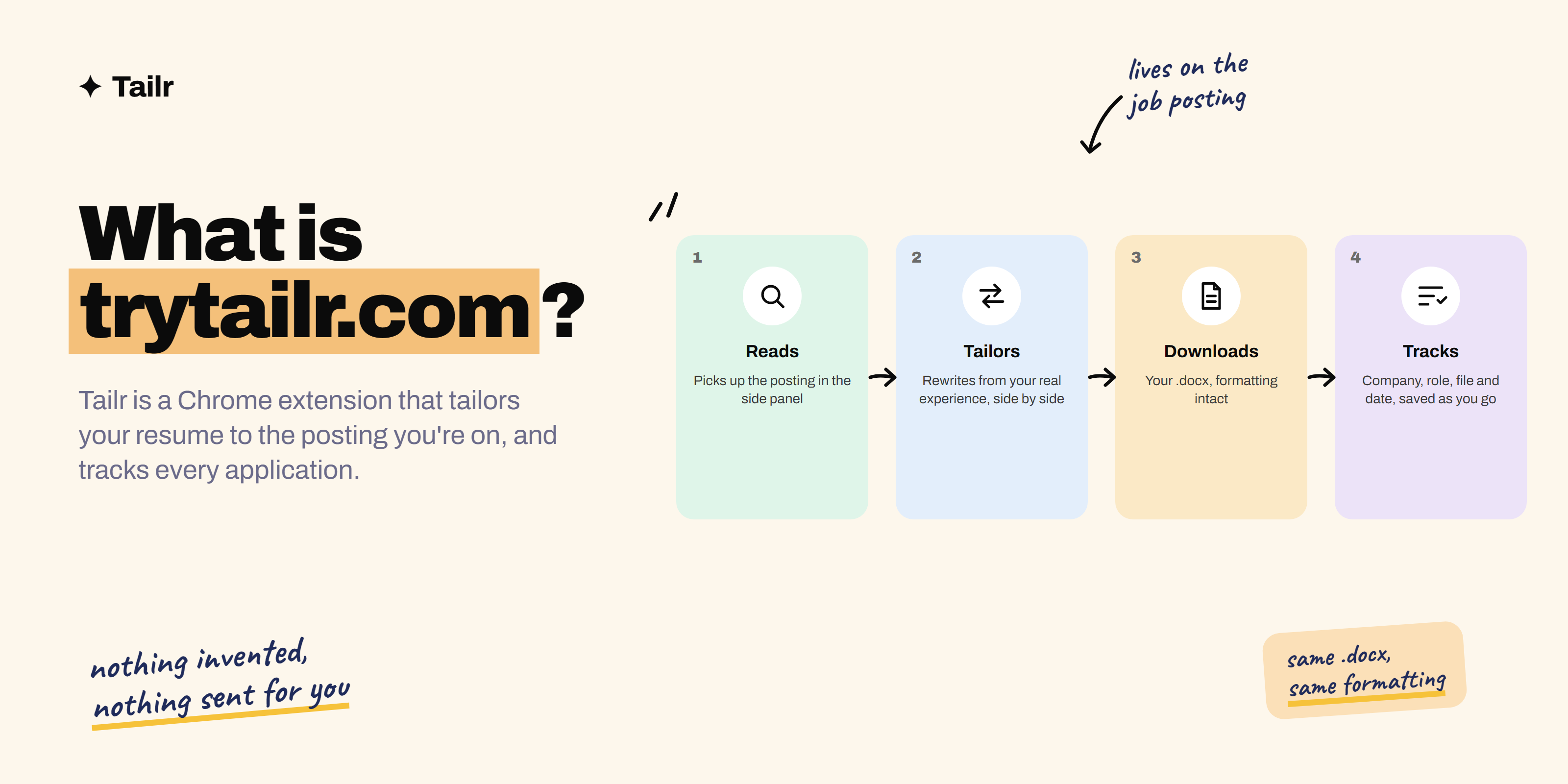
If you’ve searched for trytailr.com, or seen Tailr mentioned in a job search thread, here’s the plain explanation. Tailr is a Chrome extension that lives on the job posting you’re already reading, tailors your existing resume to that posting without inventing anything, hands back the same file with the formatting intact, and remembers every application you send. This post covers what it does, how it works step by step, what it deliberately doesn’t do, and who it’s for.
The short answer: trytailr.com is the home of Tailr, a Chrome extension for job applications. It:
- Reads the job posting on LinkedIn, Greenhouse, Lever or any careers page.
- Checks it against your resume line by line.
- Suggests tailored rewrites drawn only from your real experience, for you to accept or skip.
- Downloads the same .docx with your formatting unchanged.
- Writes a matching cover letter.
- Tracks every application in one place.
It never applies on your behalf and never adds experience you don’t have.
The problem it solves
Tailoring a resume to a posting is the single most effective thing you can do for an application, and it’s the thing people skip, because it takes about twenty minutes each time. You read the posting, open your resume, move the relevant project up, rewrite three bullets in the company’s language, cut the paragraph they don’t care about, and save a new version. Then you do it again for the next one. After ten applications you have ten files with similar names and no memory of which went where.
Most tools that promise to fix this put themselves in another tab. You paste the posting, paste your resume, wait, copy the result back into a document, and repair the formatting. By the time you’ve done that, you could have made the edits yourself.
Tailr’s answer is to sit where the work already is: on the posting.
How Tailr works
1. It reads the posting. Open a job on LinkedIn, Greenhouse, Lever or any careers site and Tailr picks it up in the Chrome side panel. It checks the description against your uploaded resume and shows you the fit plainly, for example that you already show 5 of the 9 things the role asks for, with each requirement marked as covered or missing.
2. It tailors from you. For each gap it can honestly close, Tailr proposes a rewrite based on something already on your resume. You see the original line and the tailored version side by side, with a note on what the change adds (“hands-on ML experience for the ‘training models’ requirement”), and you choose “use this” or “skip” for each one. Suggestions that would require inventing experience don’t get made.
3. It downloads your file. The output is the .docx you uploaded, with the same fonts, spacing and layout. Only the words moved. There’s a summary of how many changes were applied and how many requirements the resume now matches, and the file is ready to attach.
4. It keeps track. Every tailored resume, company, role, application date and follow-up is saved automatically as you go. The tracker is the part people don’t expect to care about and end up relying on, because it’s the difference between “I applied to Stripe on the 2nd with the risk-focused version” and forty open tabs. It also generates a cover letter to match the tailored resume when you need one.
What Tailr won’t do
Two things, on purpose.
It won’t make things up. A resume that claims experience you don’t have falls apart in the first ten minutes of an interview. Tailr works from what you’ve actually done, and it’s built so that every line it produces is one you could defend out loud. If you want the reasoning behind that, our guide on how to tailor your resume without lying spells it out.
It won’t apply for you. Nothing is sent anywhere on your behalf. You read the result, change what you want, and decide whether and when to submit. Auto-apply tools produce generic applications that recruiters recognize; Tailr is built for the opposite.
Who it’s for
Anyone applying to more than a handful of roles where the postings differ. That includes new graduates sending out dozens of applications, engineers and analysts whose job titles hide very different day-to-day work, career changers who need to emphasize different parts of the same history for different roles, and anyone who has ever lost track of which resume version went to which company.
It’s less useful if you’re applying to one job, or if every posting you target is identical. The value scales with the number and variety of applications.
Tailr and other tools
Tailr is one part of a job search, not the whole thing. It doesn’t find jobs for you, so pair it with the job boards in our guide to the best sites for your next job search. It doesn’t prepare you for interviews, so use the tools in best tools for interview preparation for that. Where it fits is the middle: every time you find a posting worth applying to, it turns the twenty-minute tailoring job into a couple of minutes and logs the result. For a broader view of what else is out there, see top AI tools for job search.
If you want more detail on a specific part, the site has pages on tailoring your resume to a job description, the ATS resume optimizer, the Chrome extension for job applications and the job application tracker.
Getting started
Install Tailr from the Chrome Web Store, upload your current resume as a .docx, and open any job posting. The side panel shows the fit immediately, and the first tailored version takes about as long as reading the job title. Try Tailr on the posting you’ve been putting off, and if anything is confusing or wrong, email support@trytailr.com. A person reads it.
Conclusion
Trytailr.com is Tailr: a Chrome extension that tailors your resume to the job posting you’re viewing, using only what’s already on your resume, keeps your formatting, writes the cover letter, and tracks every application. It doesn’t invent experience and it doesn’t apply for you. It just removes the twenty minutes of repetitive work between finding a job you want and sending a resume that fits it.
Frequently asked questions
01What is trytailr.com?
Trytailr.com is the website for Tailr, a Chrome extension that tailors your resume to the job posting you're viewing. It reads the posting, compares it to your resume, suggests changes drawn only from your real experience, gives you back the same .docx with the formatting intact, and keeps a record of every application you send.
02Is Tailr free?
Tailr is free to install from the Chrome Web Store and you can start tailoring right away. Details of plans and limits are on the site, and you can email support@trytailr.com with any question about them.
03Does Tailr make up experience on my resume?
No. Every suggestion comes from something already on your resume. Tailr rewrites and reorders your real experience to match the posting's language and priorities, and it shows you the original and the tailored line side by side so you can keep, edit or skip each one. Nothing is added that you didn't do.
04Which job sites does Tailr work on?
Tailr works on LinkedIn, Greenhouse, Lever and any careers page with a job description on it. It opens in the Chrome side panel next to the posting, so you don't copy or paste anything between tabs.
05Does Tailr apply to jobs for me?
No. Tailr never sends anything on your behalf. It prepares the tailored resume and cover letter, you review and download them, and you submit the application yourself. It then logs the company, role, file and date so you can track where you've applied.
06Is Tailr an ATS resume checker?
Partly. Tailr shows you how many of the posting's requirements your resume already covers and which are missing, which is what an ATS or a recruiter is looking for, and then fixes the gaps it honestly can. It's built around the job posting rather than a generic score, so the result is a resume that matches this role, not a number.