How to Optimize Your LinkedIn Profile to Get Hired in 2026
· updated
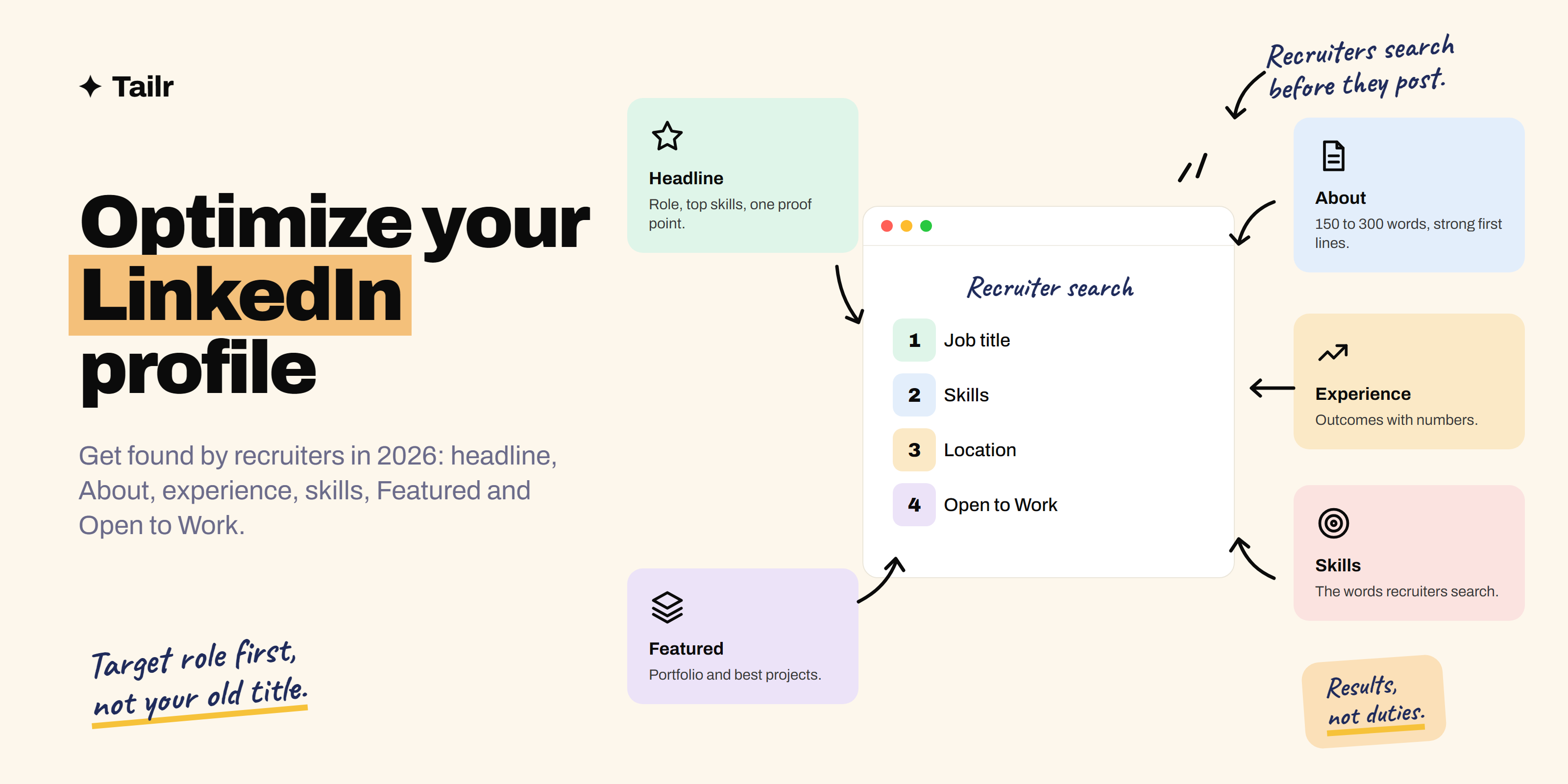
Recruiters don’t only wait for applications; they search LinkedIn for people who match their open roles, and they judge you in the few seconds it takes to scan your profile. If your headline says “Seeking opportunities” and your About section is empty, you won’t come up in their searches, and you won’t make it past the glance if you do. This guide covers every section of your profile, in order of impact, with examples you can adapt.
The short answer: To optimize your LinkedIn profile to get hired in 2026:
- Use a clear, friendly photo and a simple banner.
- Write a headline with your target role, top skills and a proof point (not “Open to work” or just your current title).
- Keep the About section to 150–300 words, opening with who you are and what you want, followed by one or two results.
- Describe experience with outcomes and numbers, not duties.
- Add 15–30 skills recruiters search for, pinning the top ones.
- Pin your portfolio and best projects in Featured.
- Set a custom URL.
- Turn on Open to Work for recruiters with your exact target titles and locations.
- Post or comment about your work once a week.
Your profile gets you found; a resume tailored to each listing gets you the interview, and Tailr does that tailoring from the job you’re viewing.
How recruiters actually find you
Recruiters use LinkedIn’s search and its paid Recruiter tool to find candidates. They typically filter by job title, skills, location, years of experience, industry and “open to work”, then scan the results page, which shows your photo, name, headline and location. Then they open a few profiles.
So your profile has two jobs:
- Be findable: contain the words recruiters search for, in the places LinkedIn weighs (headline, current title, skills, About).
- Be convincing in seconds: a clear headline, an About opening that tells them what you do, and proof they can see.
1. Profile photo and banner
- Photo: your face filling most of the frame, good light, plain background, looking like you do on a video call. Profiles with photos get noticeably more views. A recent phone photo by a window is fine.
- Banner (1584 × 396 px): simple beats busy. Your target role in a few words, your portfolio URL, or an image of your work. Free tools like Canva have LinkedIn banner templates.
2. Headline: the most important 220 characters
Your headline follows you everywhere: search results, comments, invitations. By default it’s your current job title, which is usually wrong for job hunting.
Formula: Target role | Top 2–3 skills | Proof point or specialism
Examples:
- “Frontend Developer | React, TypeScript, Accessibility | Built UI used by 40k monthly users”
- “Data Analyst | SQL, Python, Power BI | Turning operations data into weekly decisions”
- “Product Manager | B2B SaaS, Payments | Shipped onboarding that lifted activation 18%”
- “Computer Science Graduate | Aspiring Backend Engineer | Python, FastAPI, Postgres”
Tips:
- Put the most important words first; only about 60–70 characters show in some places.
- Use the job title recruiters search for (“Software Engineer”, not “Code Ninja”).
- Skip “Open to work”, “Seeking opportunities” and “Passionate about”. Open to Work has its own setting.
3. About section: your pitch in 150–300 words
The limit is 2,600 characters, but only the first few lines show before See more. Make them count.
Structure:
- Opening (2–3 lines): who you are, what you do, and what you’re looking for.
- Proof (2–4 lines): one or two specific achievements with numbers.
- Skills and tools: a short line or list, using the words recruiters search for.
- Personality (optional, 1–2 lines): what you care about or do outside work.
- Call to action: how to reach you and a link to your portfolio.
Example:
I’m a data analyst who turns messy operations data into decisions people actually use. I’m looking for analyst roles in e-commerce or logistics.
At Acme Retail I built the supply dashboards our team checks every morning, cutting weekly reporting from 6 hours to 1, and found a stock-out pattern that saved about ₹12 lakh a quarter.
Tools: SQL, Python (pandas), Power BI, Excel, dbt.
Outside work I analyse cricket stats for fun. Portfolio: yourname.dev · Email: you@example.com
Write in the first person, keep paragraphs short, and cut every adjective you can’t back up.
4. Experience: outcomes, not duties
Recruiters skim this like a resume. For each role:
- Title: your real title. If it’s unusual, add the common equivalent: “Member of Technical Staff (Software Engineer)”.
- Description: two to five bullets, each an achievement: action + what you did + result.
- Weak: “Responsible for social media.”
- Strong: “Grew Instagram from 2k to 15k followers in 8 months with a weekly short-video series; drove 22% of site sign-ups.”
- Skills: add the skills you used to each role; it links them to real experience.
- Media: attach a project, deck or article where you can.
No experience yet? Add projects, internships, volunteering, freelance work and open source under Experience or Projects. How to write a resume with no experience has ideas that work here too, and what is open source contribution explains how to get some.
5. Skills: the searchable keywords
- Add the skills in the job listings you want. Paste three listings side by side and note the skills that repeat. Resume keywords explains how to find them.
- Aim for 15–30 relevant skills (LinkedIn allows up to 100); remove irrelevant ones.
- Pin your top skills so they show first.
- Link skills to the roles and projects where you used them.
- Ask two or three colleagues to endorse your most important skills; offer to do the same.
- Take LinkedIn’s skill assessments only if you’ll pass comfortably; a badge is a small bonus, not a requirement.
6. Featured: show your work
The Featured section sits near the top of your profile and is the easiest way to give proof. Pin:
- Your portfolio (see how to build a portfolio to get hired in 2026).
- One or two live projects or GitHub repositories.
- A post where you explained something you built or learned.
- A case study, talk, article or certificate that matters for the role.
7. Custom URL, contact info and location
- Custom URL: change
linkedin.com/in/firstname-lastname-8a7b3c21tolinkedin.com/in/firstnamelastnameunder Edit public profile & URL. Use it on your resume. - Contact info: add your portfolio and a professional email.
- Location: set the city you want to work in, or where you are if you’re open to remote. Recruiters filter by location, so an empty or wrong one hides you.
8. Open to Work: tell recruiters directly
Under your photo, click Open to → Finding a new job. Add:
- Job titles: up to five specific ones (“Data Analyst”, “Business Analyst”, “Product Analyst”).
- Locations and work types: on-site, hybrid, remote.
- Start date and job types (full-time, contract, internship).
- Visibility: “Recruiters only” signals to people using LinkedIn’s recruiting tools without the public green frame; “All LinkedIn members” adds the #OpenToWork frame. Both are fine; choose what’s comfortable, especially if you’re currently employed.
9. Education, certifications and recommendations
- Education: include relevant coursework or projects if you’re early in your career.
- Certifications: only ones that matter for your target role (cloud, data, security, a respected course).
- Recommendations: two or three short ones from managers, clients or teammates are strong social proof. Ask specifically: “Would you write two lines about the dashboard project we did together?”
10. Activity: be visible, not loud
Hiring managers notice people who share useful work. You don’t need to become an influencer:
- Post once a week about something you built, learned or noticed: a project write-up with a screenshot, a lesson from a mistake, a short tip.
- Comment thoughtfully on posts by people at companies you like. A good comment gets seen by the author and their network.
- Share projects when you ship them, with the live link.
LinkedIn profile checklist
| Section | Done when… |
|---|---|
| Photo | Clear face, good light, recent |
| Banner | Simple, shows your role or portfolio |
| Headline | Target role + top skills + proof point |
| About | 150–300 words, strong first lines, contact at the end |
| Experience | Achievement bullets with numbers, skills linked |
| Skills | 15–30 relevant, top ones pinned |
| Featured | Portfolio and best projects pinned |
| URL | Custom and on your resume |
| Location | The city or remote preference you want |
| Open to Work | Specific titles, locations, work types |
| Activity | One useful post or several comments a week |
Use AI to improve your profile, carefully
Claude or another assistant can speed this up. Try:
Here is my LinkedIn profile text and three job listings I'm targeting.
1) Suggest three headline options under 220 characters using the words
these listings use. 2) Rewrite my About section to 200 words, keeping my
real achievements and voice, no buzzwords. 3) List skills from the listings
that I clearly have based on my experience but haven't added.
Don't invent anything I haven't done.
Then edit so it sounds like you. Recruiters see plenty of generic AI-written profiles.
Your profile gets you found; your resume gets you the interview
LinkedIn is one profile for every recruiter; each application still needs a resume that matches that specific job. Tailr is a Chrome extension that tailors your resume to the job listing you’re viewing, including LinkedIn job posts, using only your real experience, then drafts a cover letter and tracks the application. For LinkedIn-specific tips, see how to tailor a resume for LinkedIn jobs.
Try TailrOnce your profile is ready, start reaching out: how to cold message on LinkedIn for a job has templates.
Conclusion
An optimized LinkedIn profile does two things: it shows up when recruiters search for your target role, and it convinces them in seconds. Get the headline right, open your About section with who you are and what you want, turn duties into results, add the skills recruiters search for, pin your best work in Featured, and switch on Open to Work. Then stay visible with a useful post or a few good comments each week.
Frequently asked questions
01How do I make my LinkedIn profile stand out to recruiters?
Use a headline that states your target role and key skills rather than just your current title, write a short About section with one or two concrete results, describe experience with outcomes and numbers, list the skills recruiters search for in your field, pin your best work in Featured, and turn on Open to Work for recruiters. Keep your job titles and location accurate, since recruiters filter by them.
02What should I put in my LinkedIn headline?
Your target role, your specialism or top skills, and one proof point or industry, within the 220-character limit. For example: Data Analyst | SQL, Python, Power BI | Turning ops data into weekly decisions for e-commerce teams. Put the most important words first, because only the first 60 to 70 characters show in search results and invitations.
03How long should my LinkedIn About section be?
Aim for 150 to 300 words. The limit is 2,600 characters, but only the first few lines show before See more, so open with who you are, what you do and the role you want. Follow with one or two specific achievements, your main skills, and how to contact you.
04Should I turn on Open to Work on LinkedIn?
Usually yes, at least the recruiters-only setting, which signals you're open to opportunities to people using LinkedIn's recruiting tools without showing the green photo frame publicly. Add the specific job titles, locations and work types you want, because recruiters filter on them.
05How many skills should I add to LinkedIn?
Add the skills recruiters search for in your target role, typically 15 to 30 relevant ones, and pin your top few. LinkedIn allows up to 100. Link each skill to the job or project where you used it, and ask colleagues to endorse your most important ones.
06Does LinkedIn activity help you get hired?
Yes. Posting about what you're building or learning, and leaving thoughtful comments on posts in your field, makes your profile appear to more people, including hiring managers. You don't need to post daily; one useful post a week, such as a project write-up or lesson learned, is enough to build visibility.