How to Build a Portfolio to Get Hired in 2026 (Step by Step)
· updated
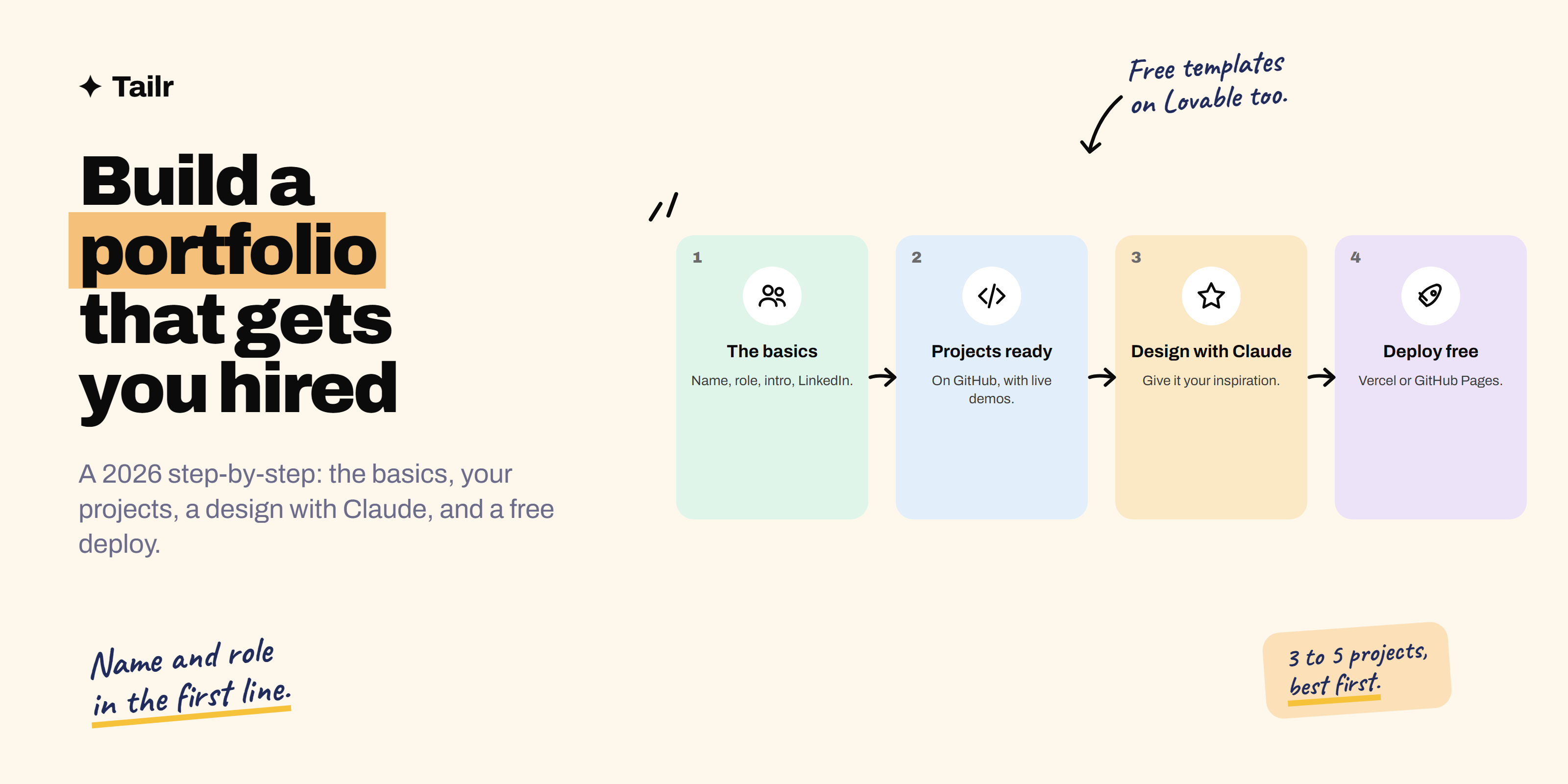
A portfolio is the link that turns “I can do this” into “here, look”. In 2026, when every resume has been polished by AI and recruiters see hundreds of near-identical applications, a simple site with real, working projects is one of the few things that still makes someone stop scrolling. The good news: you can build one in a weekend, for free, even if you’ve never made a website. This guide takes you through it in four steps.
The short answer: To build a portfolio that gets you hired in 2026, follow four steps:
- Gather the basics: your name, target role, a two-to-three sentence intro, LinkedIn, GitHub, email, and your resume.
- Get your projects ready: three to five of them, each on GitHub with a README and ideally a live demo.
- Pick a design: collect two or three portfolios you like and give them to Claude as inspiration, or start from a free Lovable template.
- Deploy it for free on Vercel or GitHub Pages.
Then put the link on your resume, LinkedIn and every application, and use Tailr to tailor the resume itself to each job.
What a portfolio needs to do
Recruiters spend seconds on a first look. In that time your portfolio has to answer three questions:
- Who is this and what role do they want? (Your first line.)
- Can they actually do the work? (Your projects.)
- How do I reach them? (Contact links, resume.)
Everything else is a bonus. A plain, fast site that answers these three beats a beautiful one that doesn’t.
Step 1: gather the basics
Before touching design, write the content. Put it all in one document; you’ll hand it to Claude in Step 3.
Your name and target role
Your first line should be your name and the job you want, specifically. “Priya Sharma, front-end developer” or “Arjun Rao, product manager for fintech”. Not “creative problem solver” or “passionate learner”. A recruiter searching for a data analyst should know within one second that you are one.
A short intro (two to three sentences)
Who you are, what you do, and what you’re looking for. Example:
I’m a data analyst who turns messy operations data into decisions. At my last role I built the dashboards our supply team uses every morning, cutting weekly reporting from six hours to one. I’m looking for analyst roles in e-commerce or logistics.
Specific beats impressive. One number beats five adjectives.
Links and contact
- LinkedIn: make sure the headline matches your portfolio’s target role, and the profile photo and name are consistent. How to optimize your LinkedIn profile covers the rest.
- GitHub (for technical roles): pin your best repositories and add a profile README.
- Email: a professional address, shown as text or a mailto link. Skip contact forms; they break and add friction.
- Resume: a downloadable PDF, kept up to date. If you’re still writing it, see how to write a resume with no experience.
- Location and work preference: “Bengaluru, open to remote” saves a recruiter a question.
Optional extras
A photo (friendly, clear, not required), an “About” paragraph with a little personality, skills grouped by area (not a wall of logos or skill bars with percentages), certifications that matter for the role, and writing or talks if you have them.
Step 2: get your projects ready (GitHub and live)
Projects are the heart of the portfolio. Aim for three to five, matched to the role you want, strongest first.
Choose the right projects
- Relevant: a data analyst portfolio shows analyses, not a to-do app.
- Real: projects that solve an actual problem, with real data, beat tutorial clones.
- Finished: working and deployed, not “in progress”.
Short on projects? You can build one in a weekend: weekend projects to build with Claude to get hired has one per role, with prompts.
Make each project hiring-ready
For every project, have:
- A GitHub repository with clean code and a README: what it does, a screenshot or GIF, the live link, the tech used, how to run it, and what you’d improve next.
- A live demo wherever possible. A recruiter will click a link; they won’t clone a repo. Deploy with GitHub Pages or Vercel.
- A short write-up for the portfolio itself, using this shape:
- Problem: what needed solving and for whom.
- What I did: your role and the key decisions.
- Result: a number, an outcome, or what users could now do.
- Tech/tools: a short list.
Non-technical roles work the same way: a PM’s “project” is a PRD plus prototype, a designer’s is a case study, a marketer’s is a campaign with results, a writer’s is published work.
Step 3: pick a design and give Claude your inspiration
Now the fun part. You don’t need design skills; you need good taste in choosing, and Claude does the building.
Collect inspiration
Spend 30 minutes finding two or three portfolios you like. Good places to look: portfolio galleries such as Awwwards (awwwards.com), Dribbble (dribbble.com) and Behance (behance.net), “portfolio” templates on Framer (framer.com), and portfolios of people already in the role you want. Screenshot what you like and note why: “the big name at the top”, “the project cards with one image each”, “the calm colours”.
Or start from a free Lovable template
If you’d rather start from something already built, Lovable (lovable.dev) has a templates gallery at lovable.dev/templates with portfolio and resume/CV templates in several styles, from minimal and monochrome to editorial and dark. You can open one, remix it into your own copy and edit it by chatting (“replace the projects with these four, make the accent colour green”). Lovable’s free plan gives you a limited number of credits each day, which is usually enough to swap in your content over a day or two. Community creators also share free Lovable templates, and public Lovable projects can often be remixed too. Export the code to GitHub when you’re done so you own it.
Give Claude the inspiration and your content
Upload your screenshots to Claude along with the content from Step 1 and your project write-ups, and use a prompt like this:
Build me a one-page portfolio website to help me get hired as a [target role].

Attached are screenshots of portfolios I like. Take inspiration from:
- screenshot 1: the large name and role at the top, lots of white space
- screenshot 2: the project cards, one image and two lines each
- screenshot 3: the simple, calm colour palette
Don't copy any of them; combine these ideas into something of its own.

Here is my content: [paste name, role, intro, links, project write-ups].

Requirements:
- Sections: hero (name, role, intro, buttons for resume and email),
  projects, about, contact.
- Mobile-friendly, fast, accessible (good contrast, alt text, keyboard nav).
- Proper page title and meta description with my name and target role,
  so it shows up well in Google and AI search.
- Plain HTML, CSS and a little JavaScript (or Astro/React if simpler),
  ready to deploy free on GitHub Pages or Vercel.
Show me the design first, then give me the files.
In Claude.ai, it can show you a live preview as an Artifact, and you iterate: “make the project cards bigger”, “use a serif font for headings”, “less colour”. With Claude Code, it creates the files directly in a project folder.
Design rules that help you get hired
- Content first. Name and role above the fold; first project visible after one scroll.
- Readable. Large enough text, strong contrast, one or two fonts.
- Fast. Compress images; avoid heavy animations and autoplaying video.
- Mobile. Recruiters often open links on their phones. Test it.
- Findable. Your name in the page title, a meta description, and real text (not text inside images) so search engines and AI assistants can read it.
Step 4: deploy your portfolio for free
Two free options, both fine for a personal portfolio:
Option A: Vercel
- Push your portfolio code to a GitHub repository.
- Sign in at vercel.com with your GitHub account. (Full walkthrough: how to deploy on Vercel for free.)
- Click Add New → Project, import the repository, and accept the detected settings.
- Click Deploy. You get a live address like
yourname.vercel.app, and every push to GitHub redeploys automatically.
Vercel’s free Hobby plan is for personal, non-commercial use, which a portfolio is. It’s the better choice if your site uses Next.js or needs server features.
Option B: GitHub Pages
- Push your code to a public repository, ideally named
yourusername.github.io. - Go to Settings → Pages, choose Deploy from a branch,
main, root, and save. - Your site goes live at
https://yourusername.github.io/.
Full walkthrough, including React apps and common errors: how to deploy a website on GitHub Pages.
Optional: a custom domain
yourname.dev or yourname.com costs about $10–15 a year and looks sharper on a resume. Both Vercel and GitHub Pages support custom domains for free with HTTPS.
Portfolio checklist before you share it
| Check | Why it matters |
|---|---|
| Name and target role in the first line | Recruiters decide in seconds |
| Three to five relevant projects, best first | Proof of skill, matched to the job |
| Every project has a live link or clear visuals | Nobody clones repos |
| Resume PDF downloads and is current | They’ll want it on file |
| Email and LinkedIn are one click away | Friction loses interest |
| Works on a phone | Links are often opened on mobile |
| Page title includes your name and role | Search engines and AI assistants find you |
| No broken links or lorem ipsum | Shows care |
| A friend has read it | Catches typos you can’t see |
Where to use your portfolio link
- Resume header, next to email and LinkedIn.
- LinkedIn: the Featured section and the website field in contact info.
- GitHub profile README.
- Email signature.
- Cold emails to hiring managers, with one specific project mentioned. See how to cold email for a job in 2026.
- Every application with a website field.
For more tool options, including Framer, Webflow and Notion, see best tools for creating a portfolio.
Match your resume to each job, not just your portfolio
Your portfolio stays the same for every application; your resume shouldn’t. Each listing values different skills, and the project you lead with should change accordingly. Tailr is a Chrome extension that tailors your resume to the job listing you’re viewing, using only your real experience, then drafts the cover letter and tracks the application, so your portfolio and resume tell the same story for each role.
Try TailrConclusion
A portfolio that gets you hired in 2026 is simple: a clear first line with your name and target role, a short intro, three to five real projects with live links, and easy ways to contact you. Gather the basics, get your projects ready on GitHub, pick a design by giving Claude your inspiration (or remix a free Lovable template), and deploy it free on Vercel or GitHub Pages. Then put the link everywhere and keep it updated as you build more.
Frequently asked questions
01What should a portfolio include to get hired?
Your name and target role in the first line, a two-to-three sentence intro, three to five of your best projects each with the problem, your role, what you built and the result, links to live demos and code, your resume as a PDF, and your contact details with LinkedIn and GitHub. Keep it to one page if you can.
02How many projects should be in my portfolio?
Three to five. Recruiters look at the first one or two, so quality matters far more than quantity. Choose projects that match the role you want, put the strongest first, and remove tutorial clones once you have better work.
03Can I build a portfolio for free?
Yes. You can design and build it with Claude's free plan or start from a free Lovable template, store the code on GitHub, and host it for free on GitHub Pages or Vercel's Hobby plan. The only optional cost is a custom domain, roughly $10 to $15 a year.
04Do I need a portfolio if I'm not a designer or developer?
It helps in almost any role. Product managers can show PRDs and prototypes, analysts can show dashboards and write-ups, marketers can show campaigns and results, and writers can show published pieces. A simple one-page portfolio gives recruiters proof that a resume can't.
05Should I use a portfolio template or build from scratch?
Start from a template or an inspiration site if you want it done in a day; build from scratch with Claude if you want it to feel fully yours. Either way, change the layout enough that it doesn't look like the default, and make sure the content, not the design, is what stands out.
06Where should I share my portfolio link?
In your resume header, your LinkedIn Featured section and contact info, your GitHub profile README, your email signature, and every cold email or application that has a website field. Use a short, clean URL, ideally a custom domain or a yourname.github.io or yourname.vercel.app address.