Best Way to Find Jobs in 2026
· updated
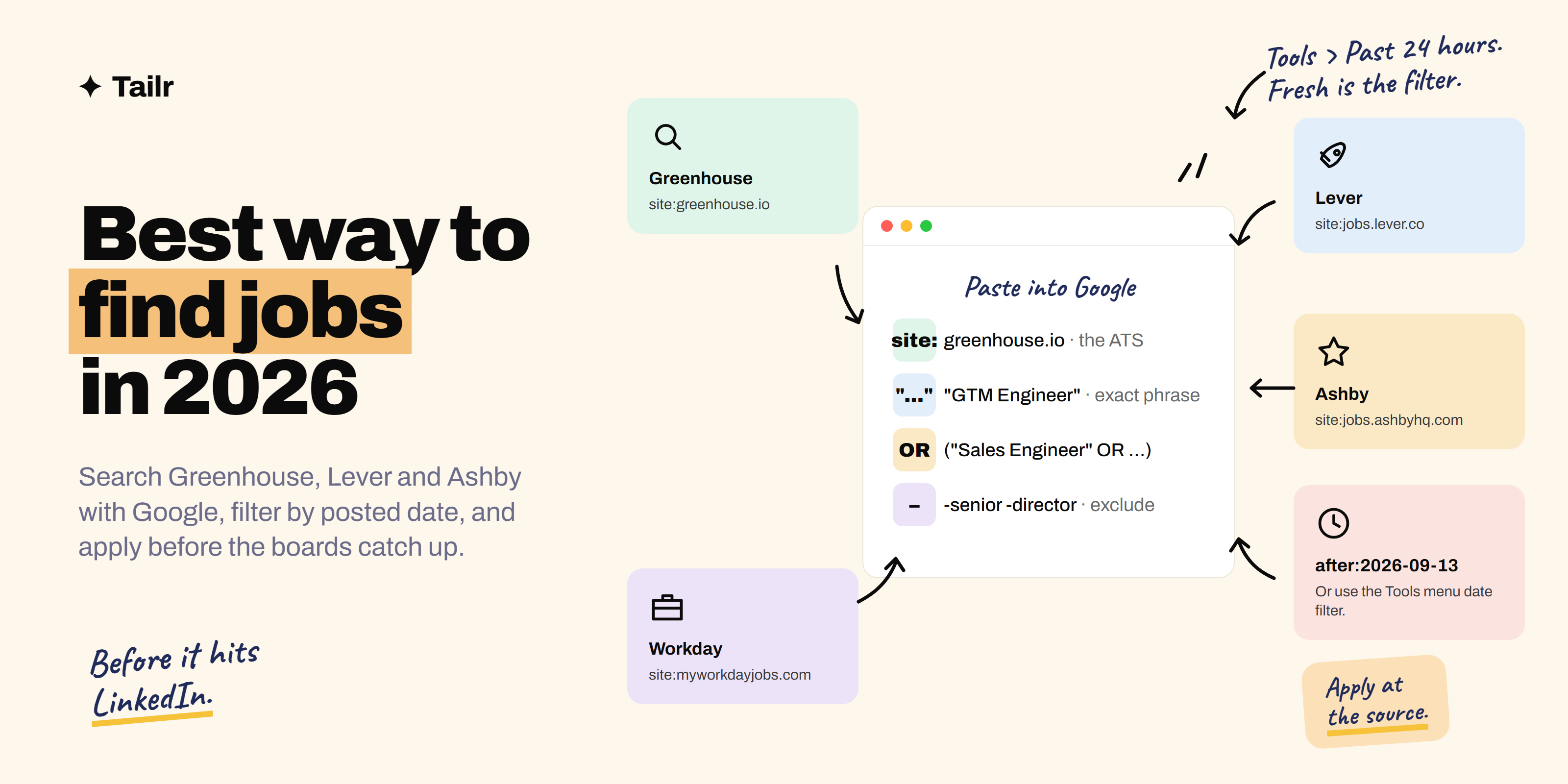
Most job postings don’t start on LinkedIn. They start on the company’s applicant tracking system, the software recruiters use to post roles and collect applications, and the job boards copy them later, sometimes hours later, sometimes days. Google indexes those original pages. So with one line of search syntax you can read a company’s new postings before the crowd shows up, filter them by date and location, and skip the boards entirely.
The short answer: Use Google as a job board that updates before the job boards do:
- Search Google for
site:greenhouse.io "GTM Engineer". - Click Tools, then Any time, and choose Past 24 hours. That shows every GTM Engineer posting on a Greenhouse job board that Google indexed today.
- Swap
greenhouse.ioforjobs.lever.co,jobs.ashbyhq.com,myworkdayjobs.comor any other ATS domain. - Add
"remote"or a city in quotes to narrow by location, useORto cover several titles at once, and a minus sign to drop the ones you don’t want. - Bookmark two or three of these searches and run them daily.
Then open each listing and tailor your resume to it; Tailr does that from the page you’re on.
Why searching the source beats the job boards
A posting on Greenhouse, Lever or Ashby is the source of truth. LinkedIn, Indeed and the aggregators pick it up afterwards, and the moment it lands there it collects hundreds of applications in a day. Three things follow from that.
- You’re earlier. Recruiters read applications roughly in the order they arrive, and many stop reading once they have a shortlist. Being in the first fifty matters more than being the best of the five-hundredth.
- You see roles that never make it to the boards. Not every company syndicates every posting. Some only ever live on the company’s own board.
- You apply straight into the company’s system. No Easy Apply pile, no third-party form that may or may not forward your details.
None of this is a secret. It’s just that most people don’t know Google can search a single website, and the ones who do rarely combine it with the date filter, which is where the real advantage is.
The basic search, one piece at a time
Here’s the whole trick in one line:
site:greenhouse.io "GTM Engineer"site:greenhouse.iotells Google to only return pages from that domain and its subdomains. Greenhouse hosts job boards onboards.greenhouse.ioandjob-boards.greenhouse.io, and the baregreenhouse.iocatches both."GTM Engineer"in quotes means the exact phrase must appear on the page. Without the quotes Google will happily return anything mentioning “engineer” and “GTM” separately, which on a job board is almost everything.
That’s it. Paste it into Google and you’ll get a page of real postings, each on the company’s own board.
If you want to know what the role in that example actually is, we’ve written up what a GTM engineer does.
Why role: and location: don’t work
You’ll see people on LinkedIn suggest searches like role:GTM Engineer location:remote. Google doesn’t have a role: or location: operator. It treats those as ordinary words, so you’ve just added “role” and “location” to your search and made it worse.
The fix is to say what you mean in quotes:
site:greenhouse.io "GTM Engineer" "remote"Now the page has to contain both exact phrases. That’s how you filter by location: "remote", "hybrid", "New York", "London", "Bengaluru". Try a couple of spellings if a city has them, and try "work from anywhere" or "fully remote" as alternatives, because job boards aren’t consistent.
AND, OR, and the minus sign
Google’s boolean rules are simple once you know the three that matter.
AND is implicit. Every word or quoted phrase you type has to appear. You never need to write AND.
OR must be uppercase, and you’ll usually want parentheses around the choices so Google groups them properly:
site:greenhouse.io ("GTM Engineer" OR "Sales Engineer" OR "Solutions Engineer") "remote"A vertical bar does the same job as OR if you prefer: ("GTM Engineer" | "Sales Engineer").
A minus sign excludes. Put it directly in front of the word or phrase, no space:
site:greenhouse.io "GTM Engineer" -senior -"staff" -directorUseful for stripping out levels you’re not applying for, or a location you can’t work in: -"United States" if you’re only eligible elsewhere.
One tip that saves a lot of noise: intitle: restricts the phrase to the page title, which on a job board is the role name. site:jobs.lever.co intitle:"product manager" returns pages titled Product Manager, not every posting that mentions one in the “you’ll work with” paragraph.
Filter by date, because timing is the whole point
This is the step most people skip, and it’s the one that makes the technique work.
Run your search, then click Tools under the search box, click Any time, and pick Past 24 hours or Past week. Google now shows only the postings it indexed in that window. Run it once a day and you’re effectively reading a live feed of new roles across every company on that ATS.
You can also type the date filter into the query with the after: operator, which uses a year-month-day format:
site:greenhouse.io "GTM Engineer" after:2026-09-13Google still calls after: a beta feature and its idea of a page’s date isn’t perfect, so the Tools menu is the more reliable option. after: is handy when you want to bookmark a query with the date baked in and just edit the number each week.
Why it matters: a posting that’s a day old has a handful of applicants. The same posting after a week on LinkedIn has hundreds, and the recruiter has probably already scheduled first-round calls. Fresh is the filter.
Every ATS domain you can swap in
The site: part is the only thing that changes between platforms. Here’s the list. Startups and mid-size tech companies cluster on the first four; bigger companies on the rest.
| ATS | Search prefix | Who tends to use it |
|---|---|---|
| Greenhouse | site:greenhouse.io |
Startups through large tech companies |
| Lever | site:jobs.lever.co |
Startups and scale-ups |
| Ashby | site:jobs.ashbyhq.com |
Newer, fast-growing startups |
| Workable | site:apply.workable.com |
Small companies, often outside the US |
| Workday | site:myworkdayjobs.com |
Large enterprises |
| SmartRecruiters | site:jobs.smartrecruiters.com |
Mid-size and large companies |
| iCIMS | site:icims.com |
Large companies, healthcare, retail |
| Rippling | site:ats.rippling.com |
Small companies already on Rippling for payroll |
| BambooHR | site:bamboohr.com |
Small and mid-size companies |
| Jobvite | site:jobs.jobvite.com |
Mid-size companies |
You can search several at once by putting the site: clauses in an OR group:
(site:greenhouse.io OR site:jobs.lever.co OR site:jobs.ashbyhq.com) "GTM Engineer" "remote"That’s the single most useful search on this page for a tech job hunt: three ATSs that cover most venture-backed companies, one title, one location, filtered to Past 24 hours.
If you’d rather use a board that’s already done this for you, our post on the best websites for startup jobs covers the ones worth trusting, and best remote job boards does the same for remote roles. The Google searches are what you run alongside them.
A five-minute daily routine
Here’s how someone hunting GTM Engineer roles might actually use this. Set it up once, then it’s a few clicks each morning.
Search 1, the core title:
(site:greenhouse.io OR site:jobs.lever.co OR site:jobs.ashbyhq.com) "GTM Engineer" "remote"Search 2, the neighbouring titles, because companies name this role five different ways:
(site:greenhouse.io OR site:jobs.lever.co OR site:jobs.ashbyhq.com) ("Sales Engineer" OR "Revenue Operations" OR "GTM Systems") "remote"Search 3, the big-company ATSs, which move slower but pay well:
(site:myworkdayjobs.com OR site:jobs.smartrecruiters.com) "GTM Engineer"For each one: run it, set Tools to Past 24 hours, and bookmark the resulting URL. The date filter is stored in the address, so tomorrow the bookmark opens straight to that day’s new postings. Open anything that fits in a new tab, close the ones that don’t, and you’re done in five minutes.
If you’d rather not remember to run them, go to google.com/alerts, paste the query, and set it to Once a day. Google emails you the new results. One alert per query is cleaner than one giant alert.
Then apply properly, and keep track
Finding a posting on day one only helps if you apply on day one. This is where the technique catches people out: it hands you three or four fresh roles a morning, and a generic resume fired at all of them wastes the head start.
Tailor each one to the posting in front of you. Our guide on how to tailor your resume to a job description walks through it by hand. If you’d rather not spend twenty minutes per role, Tailr is a browser extension that reads the Greenhouse, Lever or Ashby page you’ve landed on, reworks your existing resume to match it without inventing anything, and writes the cover letter. It also logs the application, so after two weeks of daily searches you still know which company you applied to on which day and who owes you a reply.
The honest limitations
- Not every company is on these ATSs. Some host careers pages on their own domain (careers.company.com), and those only show up if you search the company by name. Big tech companies mostly do this.
- Google indexing lags. A posting can be live for a few hours before Google sees it. Daily searching still catches it far earlier than the boards do.
- Some pages need JavaScript to render, Ashby in particular, so the Google snippet may look thin. Click through; the posting is there.
after:is imprecise. Google’s date for a page is its best guess, so pair it with the Tools filter rather than relying on it.- Always apply on the page you land on. If you find a posting through Google and then see a copy on a job board, apply at the source. The source is the company’s own system.
Related guides
- Best Sites for Your Next Job Search in 2026
- Top 10 Places to Find Jobs Online in 2026
- Best Job Boards for Tech Jobs in 2026
Conclusion
site: plus a quoted job title plus the Past 24 hours filter turns Google into a job board that updates before the job boards do. Add OR to cover the titles companies use for the same role, a minus sign for the levels you don’t want, and a location in quotes. Bookmark three searches, run them each morning, and apply the same day with a resume tailored to that posting. That’s the whole method, and it costs nothing but five minutes.
Try Tailr to tailor your resume from the posting you just found and keep every application in one place.
Frequently asked questions
01How do I find jobs on Greenhouse with Google?
Search Google for site:greenhouse.io followed by the job title in quotes, for example site:greenhouse.io "GTM Engineer". Add a location word in quotes such as "remote" or "London" to narrow it, then open Tools, click Any time and pick Past week or Past 24 hours so you only see fresh postings. The same pattern works for Lever (site:jobs.lever.co) and Ashby (site:jobs.ashbyhq.com).
02Why don't role: and location: work in Google search?
They aren't Google operators. Google treats role:GTM or location:remote as ordinary words, so the search gets worse, not better. Use quoted phrases instead: site:greenhouse.io "GTM Engineer" "remote". The only operators you need for job hunting are site:, quotes, OR, the minus sign, intitle: and after:.
03Does the site: search find every company's jobs?
No. It only finds companies that use one of the applicant tracking systems you name and let Google index their postings. Most startups and mid-size tech companies use Greenhouse, Lever, Ashby or Workable; larger companies tend to use Workday, SmartRecruiters or iCIMS. Some companies host their careers page on their own domain, and those won't show up unless you search the company name directly.
04How often should I run these searches?
Once a day, filtered to Past 24 hours, takes about five minutes and catches most new postings within a day of going live. Early applications are the ones a recruiter actually reads, so daily beats a weekly binge. Bookmark each search or set a Google Alert so the routine is a click, not a retype.
05Can I get these job searches delivered by email?
Yes. Go to google.com/alerts, paste the exact query including the site: part, set the frequency to As-it-happens or Once a day, and Google emails you new results. One alert per search works best, so a GTM Engineer search and a Sales Engineer search would be two alerts.
06Is applying on the company's career page better than applying on LinkedIn?
Usually. The listing on Greenhouse or Lever is the source; job boards copy it later, sometimes days later. Applying at the source means you're in the queue earlier, your application goes straight into the company's system, and you skip the Easy Apply pile. Always apply on the page you land on, not a copy on an aggregator.