Top 10 Places to Find Jobs Online in 2026
· updated
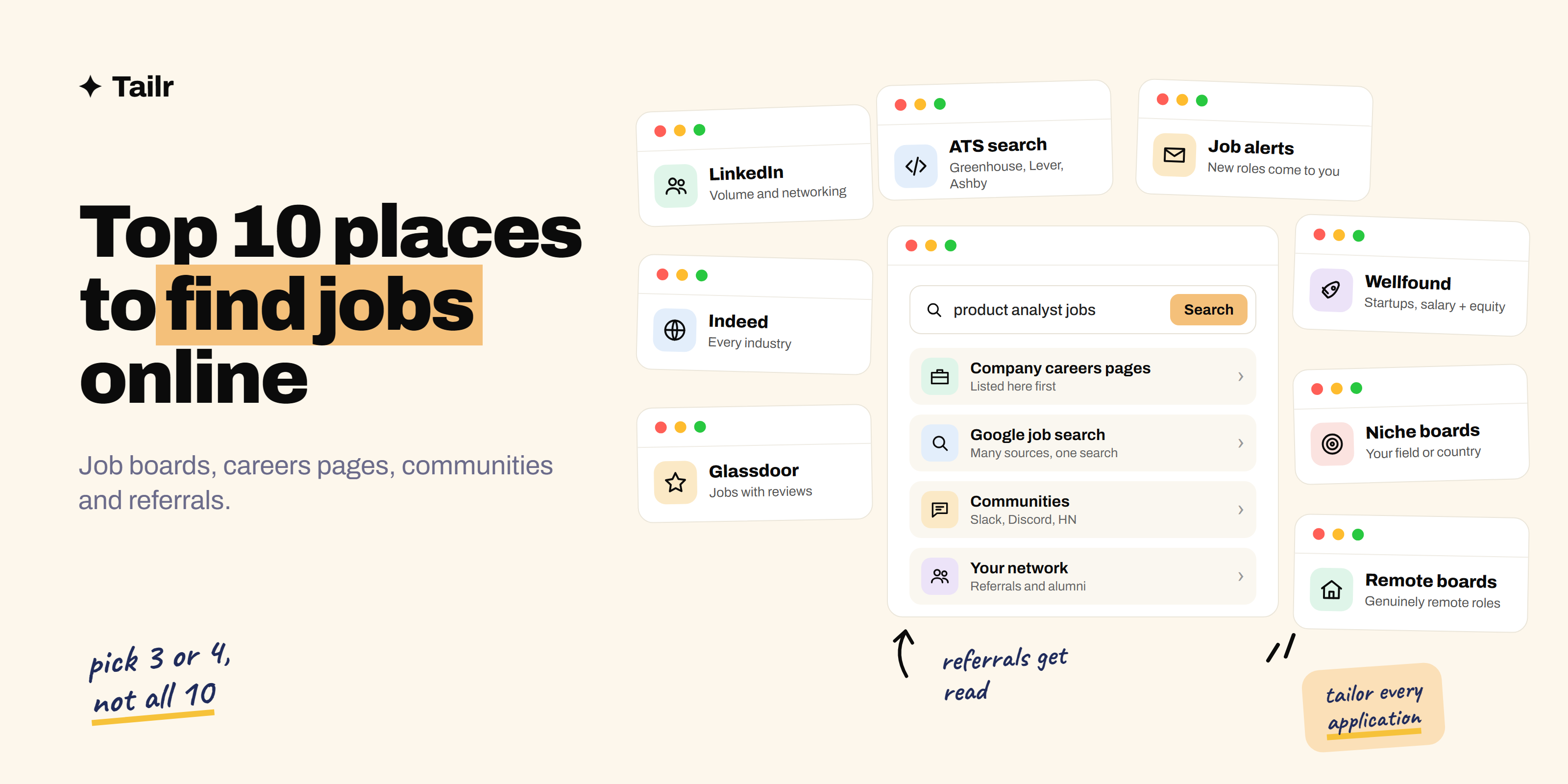
“Where do I even look?” is the first question in any job search, and the honest answer is: not just job boards. The big boards are a good start, but some of the best roles are on company careers pages, in industry communities, or shared through someone you know before they’re posted widely. These are the ten places worth your time in 2026, what each is best for, and how to combine them without drowning in tabs.
The short answer: The top places to find jobs online are:
- LinkedIn, for volume.
- Indeed, for volume.
- Company careers pages, for direct and sometimes unadvertised roles.
- Google’s job search, for a combined view.
- Glassdoor, for listings with company reviews.
- Wellfound, for startups.
- Niche boards for your industry or country.
- Remote boards like We Work Remotely, for remote work.
- Online communities such as Slack groups and Hacker News’ Who is Hiring thread.
- Your own network, for referrals.
Pick three or four, set alerts, and tailor every application. Tailr tailors your resume from the listing you’re viewing on any of them.
How to choose where to look
Before the list, a quick filter. Good places to look have:
- Fresh listings with a clear posting date, because many roles fill within weeks.
- Enough roles in your field and location to be worth checking daily.
- Alerts, so new roles come to you.
- A low scam rate. Established boards, company sites and trusted communities are safest.
Use a mix of broad (lots of listings) and narrow (fewer, better-matched listings). That’s the combination that works.
1. LinkedIn
Website: linkedin.com/jobs
The largest professional job platform, with millions of listings and the network around them. You can filter by title, location, remote, experience level and date posted, and Easy Apply makes applying fast. Its real strength is what happens after you apply: you can see who works at the company and message the hiring manager.
Why use it: volume, company research and networking in one place.
Best for: professional and corporate roles at every level. How to tailor a resume for LinkedIn jobs covers how to apply well there.
2. Indeed
Website: indeed.com
One of the biggest job sites in the world, covering almost every industry and pay level, from hourly retail and warehouse roles to engineering and healthcare. It pulls in listings from company sites and has its own quick-apply flow, plus salary data and company reviews.
Why use it: the widest range of roles anywhere, including many that never appear on LinkedIn.
Best for: hourly, local and skilled trade roles, and anyone who wants maximum coverage. How to tailor a resume for Indeed jobs explains screener questions and uploads.
3. Company careers pages
Website: the company’s own site, usually /careers or /jobs
If you know which companies you’d like to work for, go straight to their careers pages. Every role is listed there first, some are never syndicated to the big boards, and applying directly means your application goes straight into the company’s own system.
A useful trick: many companies host their job pages on applicant tracking systems. Searching Google for site:boards.greenhouse.io, site:jobs.lever.co or site:jobs.ashbyhq.com plus a job title shows roles across thousands of companies that use those systems.
Why use it: first access to roles, no middleman, lowest scam risk.
Best for: anyone with a list of target employers.
4. Google’s job search
Website: google.com (search “[job title] jobs near me” or “[job title] jobs [city]”)
Search a job title with “jobs” and Google shows a listings panel pulling from employer sites and job boards, removing duplicates. You can filter by date posted, job type and location, then click through to apply on the original site.
Why use it: one search across many sources, and a quick way to spot listings on boards you’d never have checked.
Best for: a fast overview of what’s out there in your area.
5. Glassdoor
Website: glassdoor.com
Best known for employee reviews and salary data, Glassdoor also has a large job board. Seeing reviews, interview experiences and pay ranges next to the listing helps you decide where to apply before you spend time on it.
Why use it: research built in. You can find out what it’s actually like to work somewhere before applying.
Best for: people choosing between several employers, and preparing for interviews.
6. Wellfound
Website: wellfound.com
The biggest startup job platform (formerly AngelList Talent). Most listings show salary and equity ranges, company stage and team size, and you can often apply directly to founders with one profile.
Why use it: transparent pay and direct access to people who hire at startups. Best websites for startup jobs covers it alongside other startup boards.
Best for: anyone who wants to work at an early or growth-stage company.
7. Niche and regional job boards
Every industry and many countries have boards that list roles the big sites miss or bury. A few examples:
- Tech: Dice (dice.com), Built In (builtin.com). See best job boards for tech jobs.
- Nonprofit and social impact: Idealist (idealist.org).
- US government: USAJOBS (usajobs.gov).
- Design and creative: Behance’s job listings (behance.net).
- India: Naukri (naukri.com). UK: Reed (reed.co.uk). Australia: Seek (seek.com.au).
Why use them: fewer listings, but a much higher share are relevant to you, and usually fewer applicants.
Best for: anyone in a specialised field or searching in a specific country.
8. Remote job boards
Website: weworkremotely.com, remoteok.com, himalayas.app
Remote-only boards filter out the “remote, but only on Fridays” listings and often say which countries or time zones a role is open to. We Work Remotely and Remote OK are the biggest; Himalayas has the best eligibility filters.
Why use them: genuinely remote roles, with eligibility stated up front.
Best for: anyone who wants remote work. Best remote job boards compares twelve of them.
9. Online communities
A lot of hiring happens in communities before a formal listing gets traction:
- Hacker News “Who is Hiring?” (news.ycombinator.com), a thread posted on the first weekday of each month where companies, many of them startups, post roles directly.
- Industry Slack and Discord groups for your field, which often have a #jobs channel.
- Reddit communities for your profession or city.
- LinkedIn and X posts from hiring managers saying “we’re hiring”, which often come before the listing gets attention.
Why use them: early access and a direct line to the person hiring.
Best for: tech, design, marketing and startup roles especially.
10. Your network and referrals
Templates for reaching out: how to cold message on LinkedIn for a job and how to cold email for a job.
Website: your LinkedIn connections, alumni network, former colleagues
Referred candidates are far more likely to get an interview than cold applicants, and many roles are filled through referrals. Tell people what you’re looking for, specifically. Check your university’s alumni directory or careers portal. Ask former colleagues where they’re working now and whether their team is hiring.
Why use it: referrals get read. It’s the highest-response channel on this list.
Best for: everyone, at every stage of a career.
The top 10 compared
| Place | Volume | Best for | Cost |
|---|---|---|---|
| Very high | Professional roles, networking | Free (Premium optional) | |
| Indeed | Very high | Every industry, hourly and local roles | Free |
| Company careers pages | Varies | Target employers, first access | Free |
| Google job search | High | Combined view across sources | Free |
| Glassdoor | High | Listings with reviews and pay data | Free |
| Wellfound | Medium | Startups, salary and equity | Free |
| Niche and regional boards | Low–medium | Specialised fields, specific countries | Mostly free |
| Remote job boards | Medium | Remote work | Mostly free |
| Online communities | Low | Early access, direct contact | Free |
| Network and referrals | Low | Highest response rate | Free |
How to search efficiently
- Pick three or four places, not ten. One broad board, one niche or remote board, careers pages for your target companies, and your network.
- Set alerts for two or three exact job titles so new roles come to you.
- Apply early. The first few days after posting are when most recruiters screen.
- Apply on the company’s site when you can, even if you found the role elsewhere.
- Tailor every application. The same resume sent everywhere gets the same silence everywhere. Tailr, a Chrome extension, tailors it from the listing you’re viewing. How to tailor your resume to a job description explains how.
- Track what you’ve applied to, including where, when and which resume version.
Where Tailr fits
Finding the job is half the work; the application is the other half. Tailr is a browser extension that tailors your resume to the job listing you’re viewing, on LinkedIn, Indeed, a company careers page or most other job sites. It puts your most relevant experience first and uses the listing’s language where it’s true, without inventing anything. It also drafts a matching cover letter and tracks every application across all the places you search. Try Tailr on the next listing you find.
Related guides
Conclusion
The best places to find jobs online are a mix: LinkedIn and Indeed for volume, company careers pages and Google for coverage, Glassdoor and Wellfound for research and startups, niche and remote boards for relevance, and communities and your network for early access and referrals. Choose three or four, set alerts, apply early and tailor every application. That’s what turns a long list of places to look into interviews.
Frequently asked questions
01What is the best place to find a job online?
For most people, LinkedIn and Indeed together cover the largest share of openings. But the best results usually come from combining one big board with company careers pages and your own network, because many roles are filled through direct applications and referrals before they spread widely across job boards.
02Where can I find jobs that aren't posted on job boards?
Check company careers pages directly, since not every role is syndicated to the big boards. Search applicant tracking system sites like boards.greenhouse.io or jobs.lever.co through Google, join industry Slack and Discord communities, watch Hacker News' monthly Who is Hiring thread for tech roles, and ask your network about openings before they're posted.
03How do I use Google to find jobs?
Search a job title plus 'jobs' and a location, for example 'data analyst jobs Bangalore', and Google shows a job listings panel pulled from employer sites and job boards. You can filter by date posted, job type and location, and set alerts. It's a useful way to see listings from many sources in one place.
04Are online job sites safe?
The major sites are, but scams exist everywhere. Never pay to apply, don't share bank details or ID documents before a verified offer, be wary of interviews held only over chat, and check that the company and role appear on the company's own website. Applying through the official careers page is the safest route.
05How many job sites should I use?
Three or four places is enough: one broad board like LinkedIn or Indeed, one niche or remote board for your field, company careers pages for your target employers, and your network. Using more mostly means seeing the same listings repeatedly and losing track of your applications.
06How do I get more responses from online job applications?
Apply early, tailor your resume to each listing so its top requirements are clearly covered, add a short tailored cover letter when you can, and follow up with the hiring manager or someone on the team. A few targeted applications usually outperform dozens of generic ones.